6

I can't get the numpad Enter key to work on OS X 10.6.5. The numpad works fine, as do the plus and minus keys. Only the Enter is not working.

I tried 2 keyboards and I get the same problem with both, so it's got to be a setting somewhere. In Keyboard Viewer, when I press the key, it shows that the ⌘ keys are pressed. And indeed, pressing Enter-L puts the cursor in the location bar of my browser, just like Command-L would. Is there a way to remap it?

Arjan
  • 30,974
  • 14
  • 75
  • 112
user19294
  • 175
  • 1
  • 5
  • Just in case it might help: Apple keyboards distinguish Enter and Return. Indeed, the numeric part has an Enter key, which is not the same as the Return key. Hence it might not work as expected when entering text. Older smaller keyboards may also have an Enter key to the right of the Space bar, often labeled as ⌅ (which recently became a second Option key instead). – Arjan Dec 03 '10 at 15:06
  • Does Keyboard Viewer show the key being pressed down when you press it? (System Preferences, Input Sources, Keyboard & Character Viewer, and then select it from the menu bar next to the clock.) – Arjan Dec 03 '10 at 15:10
  • No, in fact when I press it it shows that the ⌘ keys are pressed. That's weird. – user19294 Dec 03 '10 at 15:18
  • 1
    And does it indeed work as the Command key then? Like Enter-L would put your cursor in the location bar of your browser? – Arjan Dec 03 '10 at 15:26
  • Yep it does just that. Is there a way to remap it? – user19294 Dec 03 '10 at 15:38
  • 2
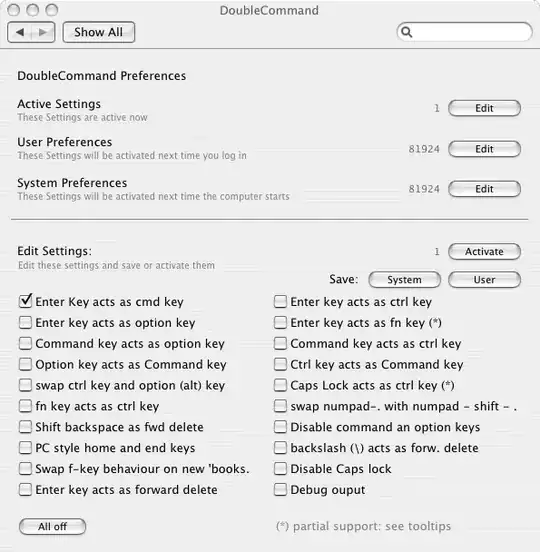
    Do you use software such as DoubleCommand or KeyRemap4MacBook, or any Input Managers? – Daniel Beck Dec 03 '10 at 16:16
  • Yep I had double command installed, and I was causing the problem. Thanks a lot. Unfortunately I can't accept a comment as an answer. – user19294 Dec 03 '10 at 16:22

2 Answers2

5

Since my comment fixed your issue, I'm posting it as an answer:

You had DoubleCommand installed.

alt text

Other possibilities would have been KeyRemap4Macbook or possibly any Input Manager.

Daniel Beck
  • 109,300
  • 14
  • 287
  • 334
1

I would check this post. I don't have my macbook to try it out myself but there were two potential solutions. Either using a program called Double Command or looking under the system preferences for modifier keys.

bacord
  • 223
  • 2
  • 12