Does Chrome's Download Manager resume downloads if the connection is lost or closed?
Asked
Active
Viewed 6.2k times
21

-
1I've yet to resume a download, and worse than failing, it reports complete falsely when downloads drop out part way through, meaning I don't know until later when I try and open the file that it hasn't downloaded properly. At that point, resuming is impossible, as is finding the original link to even attempt a second download. Have yet to see this mystical resuming people are claiming it has. We – Mar 01 '11 at 10:06
-
2As of Chrome 23 (Dec 2012), resuming capabilities are shaky. You can, however, easily [resume a download using wget](http://www.supermind.org/blog/844/resume-cancelledcrashed-downloads-in-google-chrome-on-ubuntuosx). Rename away the `.crdownload` extension if it exists, then run `wget --continue
` – Dan Dascalescu Dec 29 '12 at 09:42 -
**Sadly not**. You can vote for the bug at https://code.google.com/p/chromium/issues/detail?id=7648 it's one of the most requested features – Colonel Panic Jul 20 '15 at 16:00
4 Answers
14
Using Chrome 4.0 on Windows XP, I started downloading a large file (1GB.zip), then used TCPView to manually close the connection. When the connection was closed, Chrome considered the download complete, there was no option to resume.

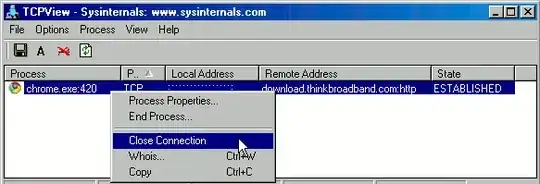

This test assumes that TCPView closing the connection appears the same to Chrome as a typical network problem. I'm not sure of the details to confirm if this is a correct assumtion.
If you have a different version of Chrome or want to test other browsers or programs, you can try using TCPView to test yourself.
Updates:
TCPView's Close Connection command seems to only work if you're logged in as an administrator. An alternative way to test is to start the download, then unplug the Ethernet cable from the computer. After a few seconds, Chrome considered the download complete and there was no option to resume.
I also tested Chrome 8.0 on Windows XP. Using TCPView to close the connection and unplugging the Ethernet cable for a few seconds both caused Chrome to consider the download complete with no option to resume.

-
1I tested on Chrome 9 dev ( Win 7), started an Ubuntu ISO download. switched off my Wifi for about a minute, and switched it back on. Chrome was able to resume the download. – Sathyajith Bhat Dec 04 '10 at 20:49
-
I did the same as Sathya (except I didn't switch off my wifi.. if you get my drift) and Chrome was unable to resume the download, simply marking it as complete with no option to resume. Sorry. – Thomas Nov 30 '13 at 06:02
9
Internet Download Manager works very well and captures everything in Chrome..
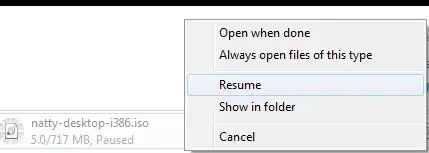
For the record, Chrome's built-in download manager can and will resume downloads.


Gaff
- 18,569
- 15
- 57
- 68

Sathyajith Bhat
- 61,504
- 38
- 179
- 264
-
@ Sathya, Did you see the feature in chrome, pause a youtube video at any point in time, right click on the video and select "Copy video URL at current time", makes a link that loads that video where you paused it. – Moab Dec 04 '10 at 21:45
-
-
22That screenshot above is of the Resume option that you have after you've paused the download. It should be noted that you do not have that option if chrome crashes or is shut down. You cannot resume those downloads. – matt Apr 02 '11 at 13:55
-
3I was downloading Ubuntu from an FTP mirror. Paused the download, waited a few hours, tried to resume - FAIL. Chrome 23 marked the download as complete. – Dan Dascalescu Dec 29 '12 at 09:39
-
1This only works if Chrome doesn't think the download completed and if you still have the download in the bottom bar of the main Chrome window. You cannot resume downloads from inside the Downloads page or anywhere else inside the Chrome interface. So while the answer is technically "yes", the reality is that this "yes" is only applicable in a small set of situations. – music2myear Nov 18 '14 at 14:35
-
1Downvoted for simply being wrong. Google has no interest to fix it even 5 years later. – Lothar Dec 16 '15 at 17:51
6
You can use Free Download Manager.
This article shows how to integrate FDM with Chrome.


-
Downvote for ` Chrome does not resume downloads` - it does ;-) – Sathyajith Bhat Dec 04 '10 at 17:41
-
2
-
-
Is that answer and your second still valid? I believe a lot has changed since 2010. – slhck Jul 20 '12 at 14:23
-
4
4
Chrome does have a download manager (chrome://downloads/), if that counts.
However the resuming (especially from a lost connection) is shaky. It works for me occasionally, but at other times, especially with large files, it stops and "finishes" the way Bavi_H describes it. At least this is what I have observed.
(btw, this is on Mac OSX)

Vervious
- 4,794
- 4
- 30
- 35