my Chrome crashed for some reason and after a start-up it appears like in a different resolution. Ugly fonts, large icons, etc. As a "plus" the tabs overexceed the maximum size allowed by the general window size. So i can't see them at all (and close them by clicking on the "x") as far as they just don't fit. I'm running WIN7 64-bit. Any ideas?
Asked
Active
Viewed 1,698 times
0

-
1Are you using one of the Beta or Dev releases? – brandon927 Dec 05 '10 at 21:24
-
It seems to be a bug, but just this fixes my issue: http://www.google.com/support/forum/p/Chrome/thread?tid=1284b32b48f44aaf&hl=en – user58070 Dec 05 '10 at 21:43
-
control panel-->appearance & personalization-->Make text and other items larger or smaller (under display)-->set to something 125% or smaller. – user58070 Dec 05 '10 at 21:46
1 Answers
0
After getting this answer to a different question, I noticed that a part of the solution involved a command that sets the browser's resolution right.
So, try this:
create an icon for the browser
right click on it - Properties, and add at the end of Target entry
/high-dpi-support=1 /force-device-scale-factor=1, leaving a space after what is already there
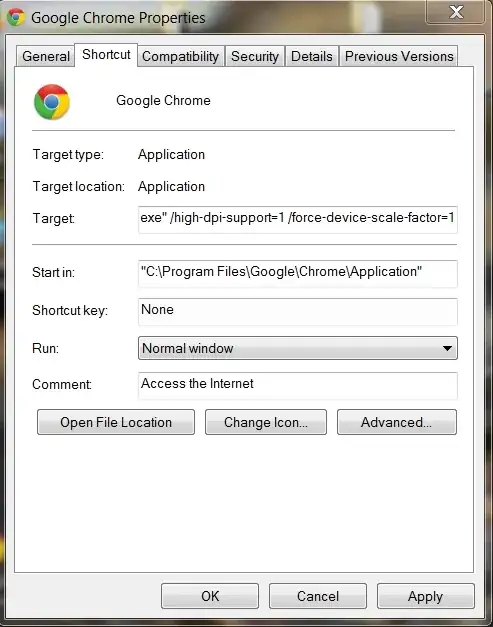
- Apply and start the browser using this icon. Other icons will not use this setting
