4

I tried opening a picture and it mentions activating unicode.

UNICODE PlugIn in Properties->Languages

I only see english and german. I already installed the plugin pack (via exe). I still cant open unicode, how do i set it up?

  • *> I still cant open unicode*   “Open Unicode”? Do you mean you cannot open a file that has Unicode characters in its name? Have you selected the check-box at the bottom of the *Languages* options page you mentioned? – Synetech Oct 12 '12 at 01:53
  • 2
    Just update to **version 4.50** or newer, which supports Unicode without need of plug-ins. See robotik's answer below. – Jim Jun 30 '18 at 09:13

2 Answers2

3

Starting from version 4.50 (released 2017-10-10) IrfanView supports Unicode natively, no more plugin or settings change required. Works both in the 32-bit and the 64-bit version.

rustyx
  • 890
  • 1
  • 10
  • 24
robotik
  • 150
  • 5
2

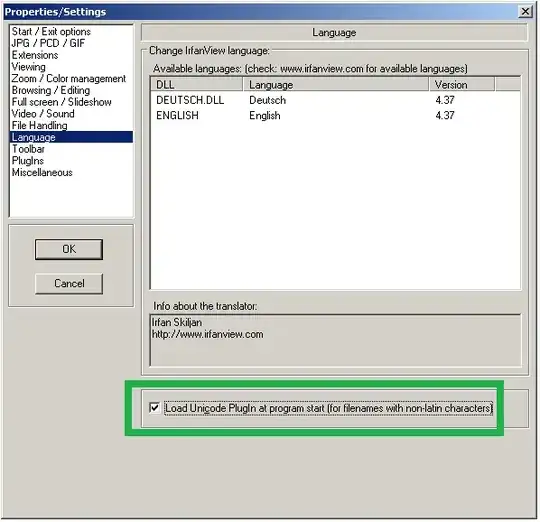
As Synetech said, tick the Load Unicode Plugin at program start (for filenames with non-latin characters) checkbox.
enter image description here

Johnny Baloney
  • 465
  • 4
  • 11
  • 1
    When I open the window the option is disabled (http://i.stack.imgur.com/DSrb6.png) what am I doing wrong? It's really frustrating, I have loads of paths with Japanese names. I don't understand why such an essential feature isn't just enabled by default. – Hayley Nov 20 '15 at 22:43
  • 4
    Okay it seems the unicode plugin (and a lot of other plugins apparently) isn't supported on the 64-bit version of the program, so you'll need the 32-bit version. – Hayley Nov 20 '15 at 22:50
  • 1
    @asdasd: Is this still true (08.05.2016, 13.15)? I still can't activate this option in the newest 64bit version of Irfanview. – PeterCo May 08 '16 at 11:19
  • It only works in the 32-bit version. – hikari Jun 18 '16 at 10:51
  • Are there sources available to submit a patch somewhere for the 64bit version? – aliopi Mar 15 '17 at 07:44
  • alternatives http://www.ilovefreesoftware.com/12/windows/free-irfanview-alternative-software.html – aliopi Mar 15 '17 at 07:47
  • 1
    @aliopi starting version 4.50 no plugin needed, works natively both in 32-bit and 64-bit. – robotik Jul 05 '18 at 10:19