Is there any way (built-in or 3rd party application) to set per-device mouse sensitivity settings in Windows 7? Two mice behave differently and constantly need to switch sensitivities when switching between which mouse is in use.
Asked
Active
Viewed 2.2k times
42

-
I am a little shocked this question has only 3 votes right now... millions of people I assume have laptops with docking stations and mice with different sensitivity. – Trevor Boyd Smith Sep 17 '11 at 21:30
-
Maybe the problem for me is that my mouse is a super-sensitive gaming mouse... so the touchpad/mouse behave radically different? – Trevor Boyd Smith Sep 17 '11 at 21:30
4 Answers
15
For me Eithermouse works the best in windows 8.
It automatically switches settings when using touchpad or mouse. This way the speed settings get automatically adjusted.
From their website:
Multiple mice, individual settings!
Instantly changes settings when any mouse is used:
- swap buttons
- mirror cursor
- adjust speeds
- and more...
Leave multiple mice on a pc and automatically swap buttons on each mouse
Have a left-handed and a right-handed mouse always connected and ready to use
Great for multi-user/public workstations to accomodate both left and right handed users.Possibly helps with RSI/injury issues by allowing switching between left and right hand.
Easily swap mouse buttons from system tray if only one mouse is used
Tray icon points to active mouse
Freeware! no ads, no nags, free software, suggestions appreciated!

Mir-Ismaili
- 283
- 1
- 2
- 11

Milan
- 151
- 1
- 3
-
Milan, please add some clarification 'why'. Do not just post links. Your answer looks spammy that way. – Jan Doggen Apr 08 '14 at 06:42
-
Milan, as per the other comments, I've added additional detail about what the software is/does – Dave Apr 08 '14 at 10:05
-
-
4I chose this solution over AutoSensitivity, since AutoSensitivity claims to be "based on mouse connect / disconnect", whereas EitherMouse switches between configurations whenever you move the mouse in question. (So even if you have your regular mouse connected, you can still use the trackpad and it will use your trackpad settings.) – Ajedi32 Mar 25 '15 at 13:50
-
1I have a normal mouse and a trackball. For the latter I wanted higher speed. Eithermouse allows you to do that, without having to disconnect either one. Does the job perfectly, and can be downloaded as a stand-alone executable. – GolezTrol Apr 08 '15 at 09:05
-
VirusTotal (a few of the sources) and Windows say there is malware in this... – EdHayes3 Sep 13 '18 at 19:58
-
Download blocked by Chrome, Firefox (with option to download anyway). Avast qurantines it reporting FileRepMalware – Apr 28 '21 at 12:07
5
If Moab's solution is not suitable, I suggest trying these two software solutions:
I am personally not inclined towards using Moab's because it has the "auto-nag until you buy it" (reminds me too much of spyware... and I know it will interrupt my workflow constantly).
I looked at screenshots for both and saw that "automousesw" has 4 super complex GUI screenshots and "AutoSensitivity" has ONE simple GUI screenshot:
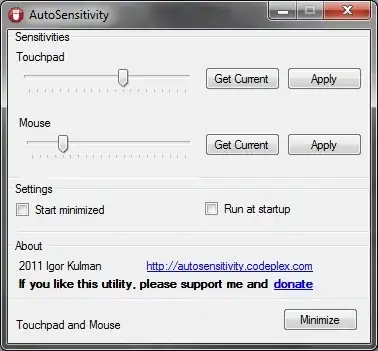
"AutoSensitivity" is a no-brainer choice for me... (keep it simple stupid). I am downloading it now. If there is no update to this post... then I have either been killed by it... or it works as advertised.

Trevor Boyd Smith
- 2,635
- 11
- 42
- 60
-
4
-
AutoSensitivity only supports one mouse and a touchpad. It does not work for two mice. – Thomas Weller Oct 29 '15 at 09:22
4
See this app
http://www.ghacks.net/2010/11/03/mouse-speed-switcher-configure-speed-settings-per-mouse/
The mouse speed settings configured in Windows apply to every mouse connected to the computer system. A laptop’s touchpad for instance has the same speed settings as a mouse that gets connected to the laptop occasionally. While many computer users do not mind, some may prefer to configure the speed per mouse to improve their workflow.
The free software program Mouse Speed Switcher is able to do that. The application can configure up to three different computer mice individually.
Mouse Speed Switcher has been tested on a Windows 7 Professional 64-bit system.


-
The thing with this app is it's not actually free. Perhaps it was at one point but I've been using this and now it demands payment (or oddly, that I upgrade): http://www.gphotoshow.com/mss_purchase.php – Frank V Apr 18 '11 at 22:21
-
0
That would be dependent on the drivers. I don't believe Windows has a way built in to do it at a per-device level, but many mice manufacturers provide that functionality when their drivers are installed. I would first make sure you have the manufacturer's drivers installed and not using the generic ones, and see then if there are additional configuration options available in mouse settings under Control Panel.

vcsjones
- 2,533
- 1
- 17
- 20
-
Yeah, but a quick way to switch or an app that looks at the hardware currently in use should be possible. – mjaggard Sep 07 '12 at 06:56