What is the kind of shortcut or way to to play/pause Windows Media Player from anywhere?
I'm tired of having to search for my Windows Media Player in my taskbar each time a colleague ask me something...
I am using version 12 of Windows Media Player.
What is the kind of shortcut or way to to play/pause Windows Media Player from anywhere?
I'm tired of having to search for my Windows Media Player in my taskbar each time a colleague ask me something...
I am using version 12 of Windows Media Player.


You are looking for global shortcuts for the media player you're using, but you don't tell what media player it is. Some media players like Winamp support global shortcuts. You can edit/view those shortcuts from the Options/Preferences menu.
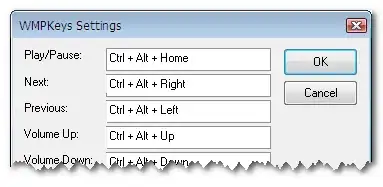
However, Windows Media Player doesn't support global hot keys like Winamp does; but there’s a great solution at SourceForge.net which is WMP Keys.
WMP Keys is global hot keys support addon for Windows Media Player. WMP Keys is easy to use and manage. Download and install it. The next time you open up Windows Media Player, open up the Tools menu, choose Options and the Plugins tab. Find the Backgrounds category and enable the Wmpkeys plugin with a check in its check-box.
At this point, you can choose the Properties button to change any of the hotkeys that are assigned to the Media Player functions.

Not certain what you mean by anywhere...however...
CTRL+P will play/pause a file while CTRL+S will stop the file entirely while Media Player 11 is running.

If you happen to have a Lenovo Thinkpad laptop, you'll notice that the down arrow key on the keyboard also has a Play/Pause symbol on it. Pressing Fn+DownArrow causes Windows Media Player to play/pause the active music. This works whenever Windows Media Player is running, even when it isn't the foreground application.
(I'm not sure if all models of Thinkpad laptop have this, but the ones I've used do, at least: T60, T500, T520 and T420.)

