26

Is it possible to have 2 or more (G)vim windows for the same session, or at least share some buffers. Here, "window" refers to a Gnome(or KDE, or Windows etc.) window, not a VIM window.

I use two monitors with xinerama and want to open two separate GUI windows instead of having a huge single one that spans multiple screens.

Atilla Filiz
  • 1,116
  • 4
  • 14
  • 20
  • have you tried :sp or :vsp ? This are vim's window splitting commands and they're great. [Here's some documentation](http://www.linux.com/archive/feed/54157) – Tom Stephens Jan 19 '11 at 03:53
  • 2
    @Tom Stephens: and that helps .. how? OP wants to position the vim-windows of ONE vim instance across his monitors. OP does not want ONE vim instance spanned across all monitors. – akira Jan 19 '11 at 08:28
  • 1
    This is important; the editor should not really be doing it's own window management. – Sam Watkins Oct 02 '12 at 02:40

5 Answers5

19

Currently gVim cannot have separate 'toplevel' windows for the same process/session. There is a TODO item to implement an inter-process communication system between multiple Vim instances to make it behave as though the separate processes are unified. (See :help todo and search for "top-level".)

Heptite
  • 19,383
  • 5
  • 58
  • 71
3

Take a look at GNU screen used in conjunction with Vim.

First window, start up gnu screen and vim

xterm
screen -S edit
vim

Second window, connect to screen session:

xterm
screen -x edit

Incredibly useful over large xinerama desktops, multiple virtual screens, or VNC sessions. One session of Vim, with lots of tabs, is all you need.

-- Tom

Tom
  • 31
  • 1
  • 1
    Points for the quick and brief tutorial, although I would call this only slightly useful, because I cannot edit different buffers of the same session this way. – Atilla Filiz Dec 12 '11 at 10:04
  • interestingly this is a point where screen wins over tmux, - in tmux attaching to the same session from a different client means you just see things mirrored across both instances... I'm considering some unholy combination of the two but haven't quite figured out what I want to do yet! – JonnyRaa Jan 10 '18 at 13:21
3

It's been some time since you asked your question and many things have improved. Nvidia has much better driver support for multiple monitors on Linux.
I've now stopped using Gvim since I moved over to KDE: Now I'm using vim-qt. It allows you to open multiple instances, in case you don't want to use vim in the terminal.

edit: My setup

jollyroger
  • 139
  • 4
  • I am trying it now, how do I use these multiple instances? It looks like regular gvim with a slightly different face to me. – Atilla Filiz Nov 14 '12 at 08:16
  • You can just start two instances of vim-qt so you can have one window for each of your screens and alt-tab betwen them, or assign hotkeys to each window. Vim-qt is written for qt, so qt-based desktop environments like KDE can utilize the windows better. That means you get to have several different graphical windows open and that your graphical vim windows can be full screen. Which was not possible with regular gvim. – jollyroger Nov 23 '12 at 14:53
  • 6
    Thanks for taking the time but this is not what I wanted. I wanted to access the same buffers from two separate GUI windows. And this is not possible as buffer sharing is still in to-do list of vim(see the accepted answer). – Atilla Filiz Nov 26 '12 at 10:28
2

I have been looking for a solution to this problem for quite a while now and just found out (pretty much by accident) that there is a GUI wrapper for Neovim, which has support for independent windows for the same instance!

https://github.com/yatli/fvim

You can detach a window into an external OS window with Ctrl+w g e.

Unfortunately I have discovered that it doesn't really play well with some plugins, so I don't use it at the moment. It might be worth keeping an eye on the following list to see if any of the other GUI wrappers implement a similar feature: https://github.com/topics/neovim-guis


Edit: I have just found some more approaches towards a solution to the same problem:

Isti115
  • 994
  • 10
  • 11
1

You can have as many vi(m) sessions as you want by using separate terminal windows for each.

As for not having them span across, I assume you are putting them to full screen and then it is expanding across both monitors as it is set to an extend the desktop. Don't maximize it and manually adjust the terminal or gvim window size.

If I missed the mark please try to elaborate a little more.

What do you mean by vim window?

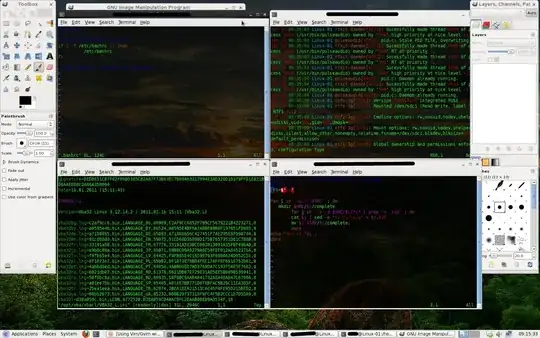
edit: Here's a pic of my screen with 4 vim instances running

Hopefully Heptite hit it, because I was kind of lost with this one.

  • 1
    That is exactly what I am doing now, manually resize them to span two monitors and then :vsplit but it looks ugly and sometimes I want to see some buffers on different virtual desktops, or cover one monitor with something else. What I want is to use two differnet terminals ans still access the same buffers from both of them. – Atilla Filiz Jan 19 '11 at 09:00
  • I understand now. Glad to see Heptite answered that for you. –  Jan 19 '11 at 13:23