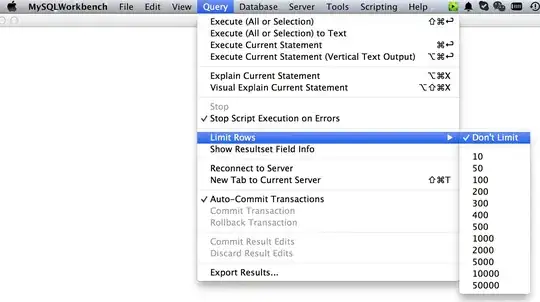
During execution of an SQL Query in MySQL Workbench, the query is automatically limited to 1000 rows. How does one prevent the tool from imposing this limit?
Asked
Active
Viewed 1.6e+01k times

2 Answers
104
You need to add your own LIMIT clause to then end of your query.
Use a number greater than the possible number of items that will be returned, say LIMIT 100000.
Source: http://wb.mysql.com/?p=230#comment-1279
Update:
(Using version 5.2.29CE, not sure how up to date I am):
On the menu bar visit Edit -> Preferences.
Jump to the SQL Queries tab.
In the Query Results section at the bottom untick the Limit Rows option.
You can adjust the limit to a higher value from this location as well, if that is preferable.
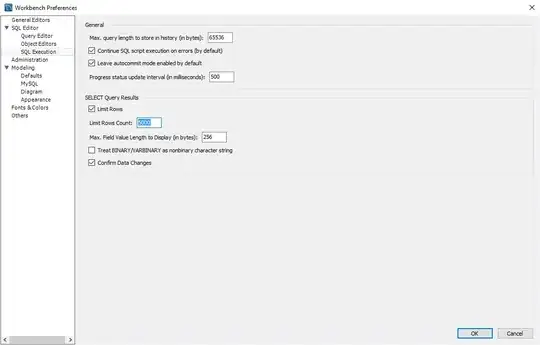
Update:
(Using version 6.3.4.0.828)
On the menu bar visit Edit -> Preferences.
Expand SQL Editor.
Select SQL Execution.
In the SELECT Query Results section, you can either uncheck Limit Rows or increase/decrease the Limit Rows Count.

Aaron St Clair
- 3
- 2

DMA57361
- 18,562
- 7
- 72
- 96
-
@BOB: You might actually want to post this as your own answer - its substancially different from the original answer, and well, this worked at *some* point – Journeyman Geek Nov 22 '12 at 09:21
-
1The `SQL Queries` tab is named `SQL Editor` in 5.2.38, and is named `SQL Execution` in version 6.2. – SPRBRN Oct 21 '14 at 09:45
-
thanks for including both the SQL way and the menu way, I used the SQL way for a one-time export. – Kmeixner Dec 22 '14 at 22:47
-
Thanks for the clear, concise answer. This works exactly as specified (as of November 22, 2012 edit) for MySQL Workbench 6.0. – Xynariz Feb 12 '15 at 18:19