16

Is it possible to save everypage you visit in a browser automatically? I do now want to rely on Cache as a huge cache will slow down the browser. A third party software or an add-on will be helpful.

I use Chrome browser, but any other browser which can help me in my requirement is okay.

Journeyman Geek
  • 127,463
  • 52
  • 260
  • 430
Ctroy
  • 741
  • 5
  • 13
  • 22
  • 3
    Save it for what? Do you actually plan to use the saved pages as an alternative cache or just keep a long history? – P.Brian.Mackey Feb 01 '11 at 17:09
  • I basically work offline some times, and I want to be able to view the saved version of a webpage. – Ctroy Feb 01 '11 at 17:15
  • Is switching browsers an option? Firefox has an offline mode you can manually enable. – Ken Feb 01 '11 at 17:52
  • Do you want to save just the viewed pages or the whole tree? How many levels deep do you want to save? – ngen Feb 01 '11 at 18:53
  • 2
    My approach would be to use some sort of caching proxy that achieves this functionality. Sadly, I know of none that do precisely this and there are limitations (mostly due to HTTPS.) – John Chadwick Jan 21 '12 at 07:47
  • `Is it possible to save everypage you visit in a browser automatically? I basically work offline some times, and I want to be able to view the saved version of a webpage. I do now want to rely on Cache.`   But you just described a cache. If you download it, then it will be cached. If you downloade everything, then it will be huge. So you want a cache but by a different name? ಠ_ఠ How about simply calling the cache a *document store*? – Synetech Nov 19 '13 at 19:16

8 Answers8

5

I'm the author of SingleFile. This Web Extension has been rewritten to be compatible with Chrome and Firefox (desktop and mobile). It has an "Auto-save" mode than allows you to save all the pages you visit in the current tab, or all the unpinned tabs, or all the tabs.

You can find more info and download links on the GitHub page: https://github.com/gildas-lormeau/SingleFile.

check_ca
  • 151
  • 1
  • 2
  • Is it possible to override the defaults using terminal or bash script? I need to enable the "auto save all tabs" mode by default and disable screen overlay while downloading. – Jishan Jan 08 '20 at 10:37
  • No, that's not possible. – check_ca Jan 09 '20 at 11:38
4

For Firefox, there is Auto Save Document addon which can store the currently shown document in a separate directory automatically when browsing a certain site. Unfortunately, it has some limitations. The documents are stored as html-text only (no embedded objects like pictures etc.), and there's 100 pages limit. So I'm not sure if it can meet your needs.

Another Firefox addon is Read It Later. It can save pages to a reading list with just one click. It's not full automatic, so you need to click on the small arrow next to the location bar whenever you want to save a page.

Mehper C. Palavuzlar
  • 55,164
  • 49
  • 193
  • 250
3

It is decently involved, as it means setting up some kind of local server, but this page describes, and has the code to create an extension that will do what you want exactly.

You will need a web server that can support PHP (XAMPP or other), and chrome, and it will probably take a little fiddling, but with some work, does what you want, and is very customizable.

soandos
  • 24,206
  • 28
  • 102
  • 134
  • This was exactly what I was looking for. After some tinkering with the script and the PHP side, it does what I want. Thanks! –  Jan 27 '12 at 11:47
  • https://craiget.com/javascript/automatically-save-html-of-every-page-you-visit Web pages has been re-designed here's the new link. – cybernard Oct 08 '18 at 22:50
  • (yet another) Updated link: https://craiget.com/automatically-save-html-of-every-page-you-visit.html – Under-qualified NASA Intern Jan 24 '22 at 01:07
0

I have not used it, but I saw this today https://www.hunch.ly/

From the site:

Your Research Sidekick

Inspector Hunchly toils in the background of your web browser to track, analyze and store web pages while you perform online investigations. Forgets nothing, keeps everything.

Edit: Also found:

Aaron Hoffman
  • 362
  • 1
  • 7
0

WARC writers

WARC readers

content extractors

other tools

  • http://proxy-offline-browser.com/ - freeware/commercial. By passing all your web traffic through WebAssistant, you instantly and transparently build a copy of all the pages you visit - so they're yours to surf offline whenever you like. When online the proxy updates your cached web pages and adds new pages automatically.

old

see also

milahu
  • 150
  • 9
0

You can use website grabber softwares or browser add-ons. Unless you want this to happen by default for every site you visit.

  • I want to save every webpage I visit, not manually, but automatically. I know it's kinda crazy, but I need it. :) – Ctroy Feb 01 '11 at 17:16
0

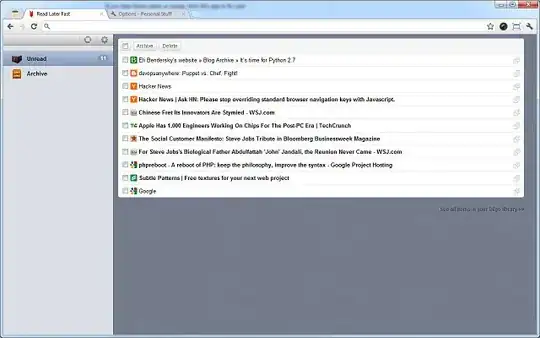
For Chrome, you might be able to use the extension Read Later Fast, which adds "Read Later" in the right-click menu to save page or link to the RLF app, then find RLF as a new tab of the browser.

image

harrymc
  • 455,459
  • 31
  • 526
  • 924
-1

You could print, safe as pdf, or use a browser add on button to do the task. Build an old school file system and keep track of it.