When i am using TextWrangler and double-click a word "game" in a sentence like "game.score", the word game is selected, but the both words and dot "game.score" is selected instead in some other editor like Smultron. How can I configure that? (in Smultron or both please)
Asked
Active
Viewed 748 times
1


-
Possible duplicate of [How to change word selection separator characters in Mac OS X?](https://superuser.com/questions/125011/how-to-change-word-selection-separator-characters-in-mac-os-x) – pkamb Dec 04 '19 at 21:41
1 Answers
2
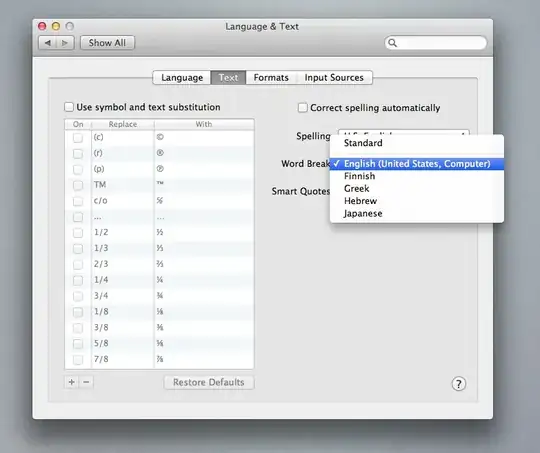
From the Apple menu choose "System Preferences…", click on "Language & Text", and then click on the tab labeled "Text". From the pop-up menu "Word Break" choose "English (United States, Computer)" and relaunch the applications you want to test this in. This should work at least in all Cocoa-Applications, and I tested it in Smultron (sourceforge variant) too.

