0

Possible Duplicate:
How to tell if a computer has a 64-bit CPU or OS

I want to know that my computer is 64-bit or 32-bit.

  1. What’s the different between 64 & 32 bit?
  2. How I can check out whether I have 64-bit or 32-bit computer?
  3. I want to install Suse 11.3 (64bit). Is it possible?
Melik4
  • 15
  • 5
  • At a simple level: Do you have >4GB RAM? If so, you're 64bit, if not, you're probably 64bit but you only need a 32bit OS. – Phoshi Feb 17 '11 at 20:17
  • My RAM is 512MB! – Melik4 Feb 17 '11 at 20:19
  • What OS are you running at the moment? – Windos Feb 17 '11 at 20:21
  • 2
    Possible Duplicate...http://superuser.com/questions/208312/how-to-tell-if-a-computer-has-a-64-bit-cpu-or-os – Moab Feb 17 '11 at 20:22
  • @Josh King:Windows XP (Service pack 3) – Melik4 Feb 17 '11 at 20:33
  • @Phoshi, I know this is closed, but 32 bit chips can support more than 4GB of system RAM since 1995, see [PAE](https://secure.wikimedia.org/wikipedia/en/wiki/Physical_Address_Extension) – Rich Homolka Feb 18 '11 at 16:41
  • @Rich; As far as I know, no major OS has shipped with PAE enabled, and that's the sort of thing you'd know about. – Phoshi Feb 18 '11 at 16:53
  • @Phoshi - Linux shipped with PAE, I know I had to get a beta RH kernel to do it :) Check the wikipedia link I put - it lists OS support, including Windows, Linux, MacOSX, FreeBSD, etc. – Rich Homolka Feb 18 '11 at 20:20
  • @Rich; I have to admit it's not something I've ever messed around with, but is it not something you have to specifically enable? It certainly is in windows, and it seems a niche enough interest that I can't imagine any OS shipping with it *enabled* by default – Phoshi Feb 18 '11 at 21:45

2 Answers2

1

Get SecurAble from this site.

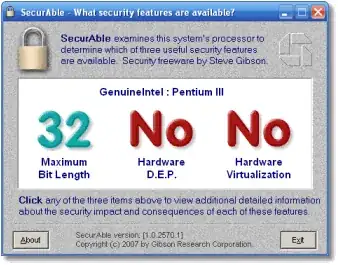
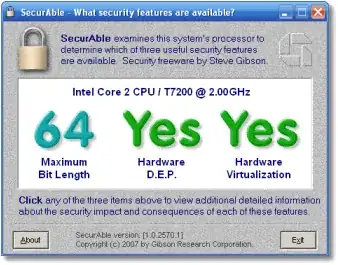
It will tell you if your processor supports 64-bit or 32-bit as in these screenshots:

32-bit:

32-bit

64-bit

64-bit

It's an old tool, but a good one for the job.

To answer your other questions:

  1. What is the difference between 64-bit and 32-bit Operating systems?

  2. See above.

  3. If you have a 64-bit processor then yes, otherwise no.

Mokubai
  • 89,133
  • 25
  • 207
  • 233
  • Err... DEP is available in 32-Bit, isn't it? I've got a Vista HP-32Bit (OS+Hardware), and it apparently supports Hardware accelerated DEP (or something similar). – Mateen Ulhaq Feb 17 '11 at 20:39
-1

Usually there is a sticker on the machine if it's 64 bit. If you don't have that it appears to be very hard to tell. Looking on the web it seems like you can only tell if the OS you're running is 32 or 64 bit.

One of the easiest ways to tell would be to try installing a 64 bit OS. If you have 32 it won't install, if you try it the other way, a 32 bit OS will install on the 64 bit processor just fine.

Another way to tell is if you have stickers on the pc that tell you what kind of processor you have and do a search at the manufacturers website to see if they only made that processor in 32 or 64 bit.

The main difference between the two for end users is that you can access more RAM from the 64 bit machine; you'll usually only get around 3.15GB of RAM usable even if you have more than that installed. The 64 bit is only limited on desktops by the number of slots you have for RAM and the amount of RAM that will fit on each chip that the MB can handle.

I hope this help answer your question.

Addendum - after posting I saw that others had asked questions and your answer of 512M of RAM tells me you almost certainly have a 32 bit machine.

Tom Strike
  • 47
  • 3