5

When you print a multi-page document into OneNote, the pages are inserted one after another into a long column.

This makes reading the text extremely difficult. Page down key would jump one screenful of text down, not one "page-ful".

Is anyone aware of a plugin/setting that would make the reading more comfortable?

studiohack
  • 13,468
  • 19
  • 88
  • 118
Roman Zenka
  • 305
  • 1
  • 2
  • 9
  • I would like a plugin that puts the page printouts as subpages instead of making them all into one long page. (I'm adding a bounty for this) – Ape-inago Mar 05 '11 at 23:13

2 Answers2

3

You may use Ctrl-Down instead PgDn for navigation. Press it twice to navigate to the next page printout.

  • Very smart hack! – Roman Zenka Mar 08 '11 at 00:32
  • @Roman Zenka: Accepting the answer is not enough. Press the Bounty button to award the bounty to Dmitry. Otherwise, the bounty will simply evaporate. – harrymc Mar 08 '11 at 08:54
  • @harrymc That bounty is not from me. Ask Ape-inago. – Roman Zenka Mar 08 '11 at 23:26
  • Life is certainly complicated around here. I upvoted, as with 2 votes Dmitry will at least get half of the bounty. – harrymc Mar 10 '11 at 06:49
  • Thanks for the answer, that was really helpful. Although it didn't address my personal issue, it was a good answer and still helped me with the issue until I could fix the underlying one. Stack Exchange emails notice if the bounty is going to expire, I wouldn't have left you hanging ;) – Ape-inago Mar 12 '11 at 02:04
  • Ctrl-Down is very useful, it appears to automatically skip to the next paragraph, which makes keyboard navigation a breeze (especially with tagging hot-keys) Well worth the points! – Ape-inago Mar 23 '11 at 07:32
1

I found this tool, which is an updated version of the printout manager for 2007 that works with 2010

The gist of the tool is that it splits printouts into multiple pages instead of having them all in one.

The 64bit version doesn't seem to install properly, but the 32bit worked like a charm. They are both in the setup.exe at the bottom of the article.

It seems to work pretty well, and is very customizable:
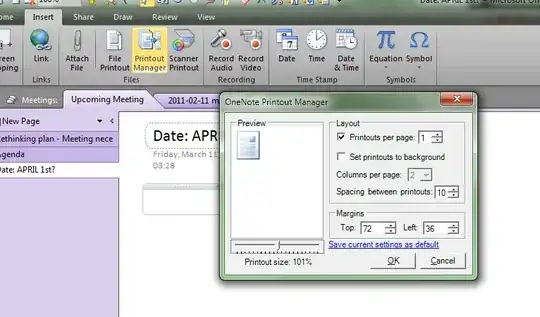
Printout Screen

Update: I ran into an issue on another machine i was setting this up on. I ended up installing the 2007 version of the tool instead. It still works with 2010 if you convert the notebook to 2007 before running it. See instructions for doing this. Please note that the old version installs itself into an add-ins tab instead of under the insert tab.

Glorfindel
  • 4,089
  • 8
  • 24
  • 37
Ape-inago
  • 326
  • 1
  • 12