85

I have an automated script that pulls backups from my website to my local computer. This script could fail; once my server was down, another time I accidentally moved my script.

How do I make Windows Task Scheduler tell me with the script fails (or doesn't run/not found)?

I don't care if a prompt comes up, an email or something that appears on my desktop. I want to be notified if something goes wrong. On my server, crontab emails me about errors - which is great. I want something like that on my windows 7 local computer.

Eliran Malka
  • 504
  • 7
  • 15
  • found the task scheduler event IDs at least https://mnaoumov.wordpress.com/2014/05/15/task-scheduler-event-ids/ –  May 25 '16 at 20:50

4 Answers4

105

When a scheduled task fails to start, an event is written to the TaskScheduler event log:

Note: The Task Scheduler log is located at (under Administrative Tools)

 Computer Management
    System Tools
       Event Viewer
          Application and Services Logs
             Microsoft
                Windows
                   Task Scheduler
                      Operational

enter image description here

Windows lets you trigger scheduled tasks to start when a variety of events happen, e.g.:

  • time of day
  • system startup
  • user login
  • event recorded in event log

Armed with this knowledge, you can create a scheduled task that that runs when your scheduled task fails:

enter image description here

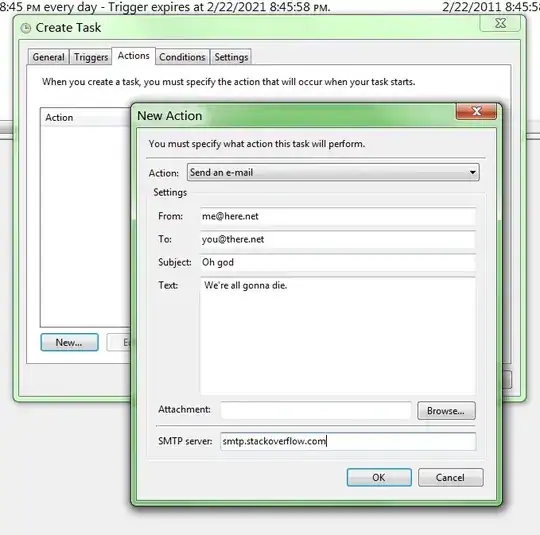
This scheduled task's action can then be set to something that sends you an alert - in your choice of methods (e.g. triggers a shutdown). You might just want it to send an e-mail:

enter image description here

This is how Windows handles everything. You can see many diagnostic tasks that trigger on an event appearing in the log. e.g. when an IP address conflict is detected, an event is written to the log:

  • Log: System
  • Source: Tcpip
  • Event ID: 4198

A scheduled task triggers on this event, and runs a program to tell you about it and to fix it. Keep in mind that the event id is not specific to just one task. Any task that generates the event 203 - Action failed to start, will trigger this task.

John M
  • 227
  • 1
  • 3
  • 12
Ian Boyd
  • 21,642
  • 49
  • 139
  • 184
  • These screenshots are from Windows 7. Windows XP doesn't support it. Windows Vista: i don't know. What version of Windows do you have? – Ian Boyd Feb 22 '11 at 23:42
  • Ian Boyd: Windows7 "home premium". Here is what i see http://i.imgur.com/Qd8QN.png –  Feb 23 '11 at 00:10
  • That screenshot is the **TaskManager**, from inside the **Task Scheduler**. Do you see **Task Scheduler** in the **Event Log**? – Ian Boyd Feb 23 '11 at 03:18
  • 2
    You get the *event id* from the event log (203 and 103). You can see the event id's in the screenshot (203 and 103). Or i can tell you the event id's: 203 and 103. – Ian Boyd Feb 23 '11 at 03:20
  • 7
    What do you do if the second task fails!?!? – William Jackson Jun 01 '12 at 14:06
  • 16
    Actually if the 2nd task fails it will launch the 2nd task which will fail which will launch the 2nd task which will fail which will launch the 2nd task which will... you get the idea. I just found this out the hard way =/ – Rob Penridge Oct 19 '12 at 20:58
  • 9
    This doesn't alert you if a task *fails*, only if it *fails to start*. Not quite the same thing. – jwg Aug 20 '13 at 15:44
  • 2
    Here are some links to the list of event ids so you can monitor other types of failures: http://technet.microsoft.com/en-us/library/dd315533%28v=ws.10%29.aspx and http://technet.microsoft.com/en-us/library/dd363625%28v=ws.10%29.aspx – Chris Smith Jan 08 '15 at 23:25
  • @jwg you can choose "Custom" instead of "Basic" Settings and select multiple event ids to include "Task Failed" – Marc Sep 29 '16 at 06:52
  • 7
    This answer is now out-of-date. I checked Windows 10 and Windows Server 2012 R2, the `send email action has been deprecated`. – TheCrazyProgrammer May 04 '17 at 05:58
  • 3
    @JohnHargrove You're now supposed to execute a powershell script. The steps involved are so complicated that it's not worth even learning. – Ian Boyd Mar 13 '18 at 12:17
  • @jwg If you create a second action in the task then that would fail to start and you should get a 203. Would that work to alert if a task fails? I'm assuming that Scheduler fires the tasks sequentially and not concurrently. – Caltor Oct 21 '19 at 12:42
23

Here is my script to alert me when my backup job has a greater value than 0.

$ScheduledTaskName = "Hans\Backup"
$Result = (schtasks /query /FO LIST /V /TN $ScheduledTaskName  | findstr "Result")
$Result = $Result.substring(12)
$Code = $Result.trim()

If ($Code -gt 0) {
    $User = "mymail@gmail.com"
    $Pass = ConvertTo-SecureString -String "myPassword" -AsPlainText -Force
    $Cred = New-Object System.Management.Automation.PSCredential $User, $Pass
################################################################################

$From = "Alert Scheduled Task <mymail@gmail.com>"
$To = "Me Gmail <mymail@gmail.com>"
$Subject = "Scheduled task 'Backup' failed"
$Body = "Error code: $Code"
$SMTPServer = "smtp.gmail.com"
$SMTPPort = "587"

Send-MailMessage -From $From -to $To -Subject $Subject `
-Body $Body -SmtpServer $SMTPServer -port $SMTPPort -UseSsl `
-Credential $Cred
}
Hans Falk
  • 231
  • 2
  • 3
  • 1
    This is a good option as the current selected answer uses a deprecated Windows feature. – John Hargrove Mar 13 '18 at 02:51
  • 1
    Please keep in mind, that this is specifically crafted solution for users with Windows in english language. The argument for ´findstr´ must be changed accordingly to user's language set in Windows. – Eda190 Oct 05 '18 at 13:59
  • 1
    I think even though we send email with PowerShell now, the trigger still should be the event log just like in the accepted answer – basin Dec 01 '21 at 14:50
7

Take a look at PushMon. You can create a PushMon URL that will be called at the end of your script. If your script doesn't run because the server was down or the script was moved, you will get notified. You can get notified by email, SMS, phone call, IM and Twitter. This will work for any operating system. This is like Pingdom but for scripts and background tasks.

3

Edit: review Ian Boyd's answer then when you get to using the Email Action, come back here.

Since Ian Boyd's original answer was posted, the Email Action in Task Scheduler was deprecated and eventually removed. But its not difficult to create a Powershell script that will send SMTP emails and run that instead. Here's an example using Powershell and system.net.mail.smtpClient:

$SmtpClient = new-object system.net.mail.smtpClient
$MailMessage = New-Object system.net.mail.mailmessage
$SmtpClient.Host = "mail.yourdomain.com"
$SmtpClient.Port = 587
#$SmtpClient.EnableSsl = $true
$SmtpClient.Credentials = New-Object System.Net.NetworkCredential( "support@yourdomain.com", "{pw}" );
$mailmessage.from = ("support@yourdomain.com")
$mailmessage.To.add("support@yourdomain.com")
$mailmessage.Subject = “Server Alert”
$mailmessage.Body = “Event 103 or 203 detected. This indicates a Scheduled Task has failed.”
$smtpclient.Send($mailmessage)

Edit the details as needed (such as "mail.yourdomain.com" and credentials "support@yourdomain.com" and "{pw}"). You might need to monkey with Port and EnableSsl.

Save this script as FailedTaskAlert.ps1 in a common folder, such as C:\Users\Public\Documents.

Now let's wire that up to a Task.

In Action tab use the Start a Program action. In Program, enter "powershell.exe" and in Add Arguments enter your ps1 file, such as "C:\Users\Public\Documents\FailedTaskAlert.ps1"

I see Hans Folk is also doing this using Send-MailMessage but I thought another cmdlet variation and an explicit explanation how the Powershell script can be wired to the Task's Action would be helpful to others.

Caveat: make sure that All Task History is enabled in the right hand Actions panel in Task Scheduler otherwise you won't get events logged. If you see the History tab with a "disabled" label, you know this feature is off.


Jeff Mergler
  • 171
  • 5