11

I'd like to transfer the (non-DRM) music I have on my iPhone to my computer.

Which application can I use to do that? I found several shareware applications but they didn't really work.

Gaff
  • 18,569
  • 15
  • 57
  • 68
Igal Tabachnik
  • 2,663
  • 8
  • 28
  • 35
  • 1
    What? You mean you can't just copy the music from it as from an external usb disk, once it's connected to your PC? – fretje Aug 19 '09 at 09:32
  • 4
    Nope, the iPhone doesn't work in disk mode. You can only transfer music TO your iPhone via iTunes... – Igal Tabachnik Aug 19 '09 at 09:35
  • @hmemcpy - if that's the case then you should have a copy of the music under iTunes. Why can't you copy that file? – ChrisF Aug 19 '09 at 09:52
  • 1
    Wow. Just found another reason why I won't buy anything from Apple to play music, thanks :) – fretje Aug 19 '09 at 09:53
  • 1
    @ChrisF I'm on another computer, the iTunes library isn't here with me. – Igal Tabachnik Aug 19 '09 at 09:55
  • @hmemcpy - Ah - I should have thought of that! – ChrisF Aug 19 '09 at 09:58
  • @fretje - Believe me, once you've owned one the fact that you can't is a non issue. As already mentioned there is software that allows it. – BinaryMisfit Aug 19 '09 at 10:00
  • I'd like to also see Mac & Linux solutions to this — if that's ok with OP. Perhaps those would fit here in the same question? – Jonik Aug 19 '09 at 12:25
  • If you've bought music from the iTunes Store, iTunes will automatically sync those purchases with your computer when it's reconnected and synced with your Mac or PC. If it's music you've ripped yourself, I think your SOL. – Chris Aug 19 '09 at 15:04

4 Answers4

11

MediaMonkey

Recent versions of MediaMonkey allow you to copy music from your iPhone to your computer. I've just tested it myself and sure enough it can transfer music from the phone to my PC.

http://www.mediamonkey.com/support/index.php?_m=knowledgebase&_a=viewarticle&kbarticleid=3&nav=0,1

You need to scroll down the left hand tree in MediaMonkey and expand your iPhone to see the music.
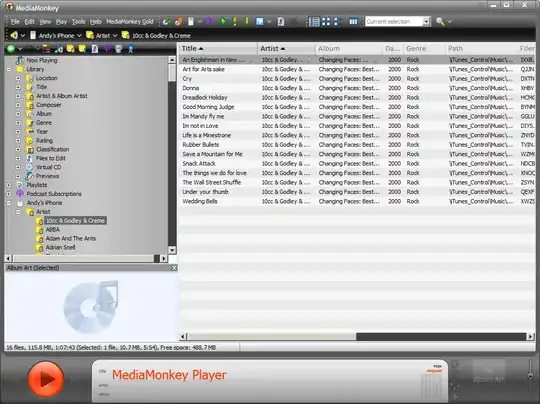
alt text

Gaff
  • 18,569
  • 15
  • 57
  • 68
andynormancx
  • 550
  • 1
  • 5
  • 16
  • Thanks, but while I got it to recognize the iPhone (it wouldn't without iTunes installed), I don't see my music in the application, so I can't copy it. I'll keep looking... – Igal Tabachnik Aug 19 '09 at 10:07
  • Are you sure you looked in the right place ? It won't be under the Library section, you need to scroll down to your iPhone and expand that. – andynormancx Aug 19 '09 at 12:08
  • Yeah, I found that, but my iPhone appears there as just 'iPhone', and the library is empty. Perhaps this has to do with v3 of the iPhone OS? – Igal Tabachnik Aug 19 '09 at 12:21
  • I am using v3, so it can't be that. – andynormancx Aug 19 '09 at 12:25
  • I find Mediamonkey can corrupt the itunes DB and forces me to resync back to itunes! I've banned it. – Morgan T. May 16 '11 at 13:41
  • Why did you edit the answer to remove CopyTrans ? Using CopyTrans solved the original questioners problem. You say "known spam". I have not connection with CopyTrans and was in no way spamming. – andynormancx Sep 08 '11 at 12:34
  • I have reverted the removal of CopyTrans, I see no justification for treating it as spam – andynormancx Sep 24 '11 at 09:37
  • It is not free, and the OP doesn't want shareware. [CT can be bought](http://www.copytrans.net/purchase.php), thus it's shareware... – Tamara Wijsman Sep 24 '11 at 10:30
  • The OP didn't say they didn't want shareware. They said they had tried some shareware apps that didn't work. If you read the fifth comment on this answer you can see that the OP commented that CT had solved their problem and thus answered their question. – andynormancx Sep 30 '11 at 00:09
  • @Tom Wijsman The OP didn't ask for a free solution, my answer doesn't claim CT is free (of course Media Monkey isn't free either, no one seems to be trying to delete the references to that). This is in no way spam. I'm very puzzled by the deletion of CT from this answer. – andynormancx Sep 30 '11 at 00:13
  • And yes I should have recommended the two products in two different answers, but that doesn't justify deleting one of the products, especially when it is the one that solved the OP's question ! – andynormancx Sep 30 '11 at 00:14
  • We do have a deleted answer listing CopyTrans there, where they were advertising the software themselves. We do not support such software... – Tamara Wijsman Sep 30 '11 at 14:05
  • Surely Superuser is about providing the most useful answer, not guessing which company may or may not have attempted to pimp their software in an answer ? Is there some some of policy in the FAQ that I can read on this ? – andynormancx Oct 01 '11 at 10:08
3

10 Alternatives to iTunes for managing your iPod:

http://www.simplehelp.net/2007/07/08/10-alternatives-to-itunes-for-managing-your-ipod

Eder Gusatto
  • 333
  • 1
  • 4
  • 13
0

You can use the iPhone App Song Exporter Pro. With it you can access the songs via a web browser, as long as the PC and the iPhone are in the same LAN.

Martin
  • 3,862
  • 3
  • 22
  • 25
0

Senuti, if you need an OS X solution.

It's simple but works well.

Jon-Eric
  • 2,172
  • 5
  • 19
  • 27