19

Today I saw an article about a half-gig, 24000 square-pixel high-res composite image of the moon.

high-res moon pic

(This is a much smaller version of the image)

I find astronomy interesting, so I thought I'd download it and take a look. With 4GB of RAM and an i5 processor, I figured my computer could handle it. Unfortunately, the built-in Windows Picture Viewer didn't do such a great job. While it opened the file without a problem, zooming in was ineffective. The zoomed out image loaded, but zooming in just showed a scaled-up version of the zoomed-out version, not any detail:
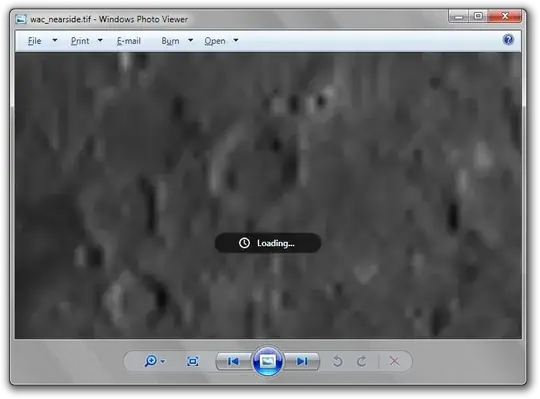
zoom fail

Closing the picture viewer also took a very long time, and the whole process used up much more RAM than the 500MB of the picture (usage went from 1.3GB to 3.8GB).

What other software would work better for this? I would prefer something that is free and fairly simple. I don't really want to use an editor (like photoshop or GIMP), just a nice lightweight viewer. Any suggestions?

Sathyajith Bhat
  • 61,504
  • 38
  • 179
  • 264
nhinkle
  • 37,198
  • 36
  • 140
  • 177
  • The Windows Photo Viewer works asynchronously. If you zoom in, it does not instantly actually zoom in, it just starts the asynchronous process of zooming. If you zoom back out, it stops the process. The program stays responsive like that. – sinni800 Mar 08 '11 at 08:40
  • My machine opened the file without problems. Windows Picture Viewer ate up 3 extra GBs of memory (on top of 2 GB before him), but scaling up and down was smooth. I have Core i7-930 and 12 GBs RAM, so this is, of course, no surprise it handled that well. But the app apparently doesn't handle well the situation, where RAM is not abundant. – Malcolm Mar 08 '11 at 12:33
  • Hm. Interesting to know that the photo viewer does work when there is enough RAM. Obviously it's not a practical solution for those of us with less memory though - a 0.5GB picture shouldn't take 3GB of RAM. Thanks for the info! @Malcolm. – nhinkle Mar 08 '11 at 17:58
  • Works great in irfanview on my i7 8gb windows 7 laptop, should work fine on your computer, only uses like 580mb of ram. Also tested microsoft photo viewer and it's super smooth. – Hardwareguy Mar 08 '11 at 18:30

4 Answers4

11

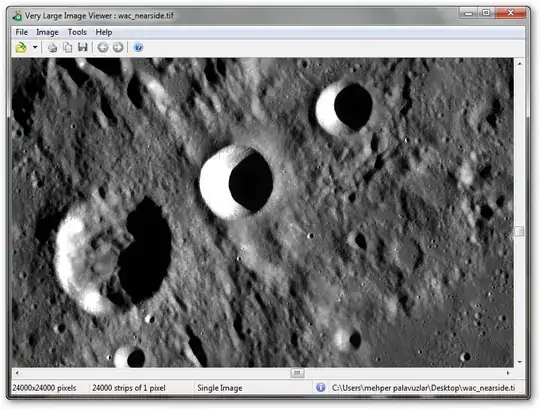
I have tested VLIV (the Very Large Image Viewer) with the moon image and it works flawlessly on my Windows 7 32-bit machine with 2 GB RAM.

First, let me give some info on this program:

  • Vliv is a Windows application that allows interactive viewing of gigantic TIFF images.
  • Vliv is known to have successfully displayed a 121,600 x 97,280 image.

Applications:

  • The most obvious application is geospatial imagery.
  • Computer generated images such as fractals or raytraced images can be calculated with very large dimensions and interactively displayed.
  • Full size photomosaics.

The only seeming downside is it's a shareware; but that's not a problem because you can use it without any time & viewing limitations.

Limitations: It only displays a message above each tile (in fact, I couldn't see it while testing the moon image), and printing and exporting are disabled.

You can visit the home page of the program to read the full information. Here is the download link to the setup file (only 244 KB).

And finally, the proof (esp. for @Ivo Flipse):

enter image description here

Mehper C. Palavuzlar
  • 55,164
  • 49
  • 193
  • 250
  • Nice suggestion! I will give that a try. – nhinkle Mar 08 '11 at 18:32
  • 1
    Hello I've been looking for a program to view very large Tiff pictures. VLIV can open them but I can't find out how to fit the image on the screen. The only thing I get is a fully zoomed image. If the image is very big is very difficult to see it, you need to drag and drag and drag. How can I zoom out to fit it on the screen? – skan Dec 19 '11 at 17:38
4

I'd put my bet on IrfanView - it's probably one of the better & lighter image viewers.


You can also try FastPictureViewer - I haven't tried it personally but it claims to have DirectX hardware acceleration.

(via product description: )

  • Integration with Windows 7 (Taskbar Jump List) and Windows Vista (thumbnail cache, "Browse with..." shell folder extension). Enables Explorer thumbnails.
  • Native 64-bit and 32-bit editions for Windows 7, Vista, XP SP3 and XP64, multi-core and multi-processor enabled to take full advantage of modern computer hardware, with optional Direct3D GPU acceleration
Sathyajith Bhat
  • 61,504
  • 38
  • 179
  • 264
  • 1
    We want proof, we want proof! – Ivo Flipse Mar 08 '11 at 07:57
  • 1
    I wouldn't try IrfanView here; it's a 32 bit application. For pictures this large 64-bit is almost a must. The FastPictureViewer looks quite interesting. – sinni800 Mar 08 '11 at 08:39
  • 1
    Although I love IrfanView, I wouldn't recommend it for very large pictures like this. – Svish Mar 08 '11 at 12:29
  • Just tested it in Irfanview and it was fast and smooth to zoom/scroll, though it's using like 580MB of ram. – Hardwareguy Mar 08 '11 at 18:20
  • @sinni800 the image is only 562MB, why would 32bit hold you back? – Hardwareguy Mar 08 '11 at 18:29
  • Works beautifully in Irfanview. The only thing that doesn't quite work is multitouch zooming gestures, but 'tis a trivial complaint. The picture is small enough that it being a 32-bit application is no problem. I will give FastPictureViewer a try sometime as well. – nhinkle Mar 08 '11 at 18:31
  • 1
    @Hardwareguy IrfanView will have to convert it to a bare BMP before being ABLE to show it. It will of course only convert small parts of it, but it could very well run out of memory. – sinni800 Mar 09 '11 at 11:24
  • Well, IrfanView worked great for me, and was already installed, so I'm marking this as accepted. I will try out the other suggestions sometime and report back on those as well. – nhinkle Mar 10 '11 at 06:00
3

Finally I've found a program that can view very large tiff images. It's called FWTools http://fwtools.maptools.org/

It can zoom in and out, export it, and make some modifications on it. And It's free. Even though It's not supposed to be an image viewer (It's a map tool) it works very well.

It opens the image almost instantaneously. It proves that loading all the image on the memory is not the way to proceed. You just need a program properly writen that only loads what it needs every moment: more detail of some areas if you zoom in, or less detailed view of the whole image.

(VLIV is also fast but doesn't allow you to zoom in/out nor make anything with the image. I contacted it's programmer and he told me that we need first to transfor the image to pyramidal format, but free windows tools don't make it well and are really slow.)

skan
  • 304
  • 1
  • 8
  • 18
1

While there are certainly software options, there are also online options. EasyZoom allows you to upload very large (8 gigabyte) image files in nearly any format, and then view them with a Google Maps style interface. This approach uses very little memory, as detail is loaded only when needed.

Finn Bear
  • 11
  • 2
  • 2
    I can't imagine an online service being very good for this when you'd have to upload 8 GB of data just to view the image! – nhinkle Apr 09 '17 at 00:12