6

I have Windows 7 Ultimate OS.

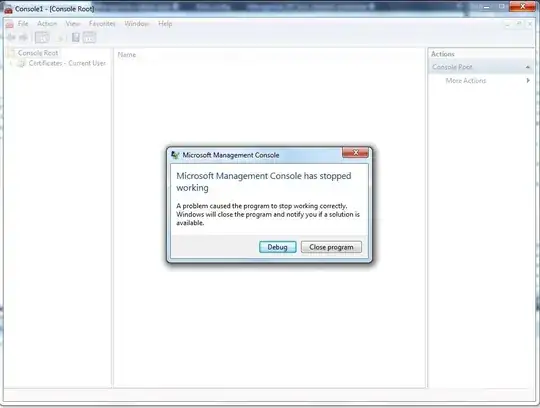
I'm opening mmc.exe as administrator and trying add Certificates or any other snap-in, then while loading that snap-in MMC breaks and displays following message and after that it closes automatically once I click on close button on that message. What could be the problem?

I did following to fix the problem but couldn't succeed any of these:

  1. I tried to repair the OS
  2. I repaired files using this method
  3. Even repaired the installation using this link

Edit:

I've even tried to rename or delete the MMC.exe file and couldn't succeed because it says I need authorization from TrustedInstaller to do those operations. In order to avoid this I've even followed instructions in this article but still it doesn't allow me to delete and now it says you need to have authorization from the user who is owner of the file, but interesting thing is that owner is logged in user only but still it asks for authorization from same user.

Update: @oldskool: Here is the debug process output: Sorry its a long output text.

'C:\Windows\winsxs\x86_microsoft.vc80.mfc_1fc8b3b9a1e18e3b_8.0.50727.4053_none_cbf21254470d8752\mfc80u.dll',

Cannot find or open the PDB file 'mmc.exe': Loaded 'C:\Windows\winsxs\x86_microsoft.vc80.crt_1fc8b3b9a1e18e3b_8.0.50727.4927_none_d08a205e442db5b5\msvcp80.dll', Cannot find or open the PDB file 'mmc.exe': Loaded 'C:\Windows\winsxs\x86_microsoft.vc80.atl_1fc8b3b9a1e18e3b_8.0.50727.4053_none_d1c738ec43578ea1\ATL80.dll', Cannot find or open the PDB file 'mmc.exe': Loaded 'C:\Windows\winsxs\x86_microsoft.windows.common-controls_6595b64144ccf1df_5.82.7600.16661_none_ebfb56996c72aefc\comctl32.dll', Cannot find or open the PDB file 'mmc.exe': Loaded 'C:\Windows\winsxs\x86_microsoft.vc80.mfcloc_1fc8b3b9a1e18e3b_8.0.50727.4053_none_03ca5532205cb096\mfc80ENU.dll', Binary was not built with debug information. 'mmc.exe': Loaded 'C:\Program Files\Microsoft SQL Server\100\Tools\Binn\Resources\1033\SqlManager.rll', Binary was not built with debug information. 'mmc.exe': Loaded 'C:\Windows\System32\msxml6.dll', Cannot find or open the PDB file 'mmc.exe': Loaded 'C:\Program Files\Microsoft SQL Server\90\Tools\Binn\SqlManager.dll', Cannot find or open the PDB file 'mmc.exe': Loaded 'C:\Windows\System32\wbem\wbemcntl.dll', Cannot find or open the PDB file The thread 'Win32 Thread' (0xf74) has exited with code 0 (0x0). Unhandled exception at 0x774d35e3 in mmc.exe: 0xC0000374: A heap has been corrupted.
enter image description here

JayaprakashReddy
  • 337
  • 4
  • 6
  • 16
  • can you Post a Screenshot what the output of the Debug Process is? – patricks Mar 14 '11 at 13:58
  • @oldskool: I've added the debug output, I'm not sure whether you are looking for the same, please let me know. – JayaprakashReddy Mar 15 '11 at 05:23
  • thanks for the output. Sadly no information about the crash i can see there. did you tried sfc /verifyonly to see if there are any corrupt files? – patricks Mar 15 '11 at 08:37
  • @JayaprakashReddy: You might erase the entire debug output except the "Unhandled exception" part at the end, which is the reason why I counseled reinstalling .Net 4 as a possible fix for the heap corruption. – harrymc Mar 15 '11 at 10:04
  • It looks like it’s probably a WinSxS problem. Open `C:\Windows\Logs\CBS` and delete or rename `CBS.log`, then run `sfc /scannow` again. Pay close attention to what it says when it finishes. Does it say that it found and fixed the problems or does it say that there were problems that it could not fix? Look at `CBS.log` now to see the results of the scan without previous clutter. Open it in a text-editor (you can copy it to avoid permission issues), then search for the term *error*. – Synetech Mar 15 '11 at 19:38
  • @Syntech: I tried same as you said and sfc scan says there are no problems at all. Renaming or deleting MMC.exe was not successful. It says I should have TrustedInstaller rights and trials even after changing the owner of the file were failed. – JayaprakashReddy Mar 17 '11 at 06:38

1 Answers1

6

Questions first :

  • Can you find anything special in the Event Log?
  • Is computer Management working?
  • Is it possible that some software installation has added a defective MMC add-on ?

A couple of ideas for this really weird problem:

  1. If you have a system restore point dating from before the problem occurred, you might restore back to it.
  2. Install or reinstall the latest Microsoft .Net Framework 4.

EDIT

A method for fixing the problem was suggested in mmc crash when adding snap in :

On the assumption that the part of your registry that deals with MMC snap-ins is corrupted, this method copies that registry part from a working computer (should have a similar setup to the problematic computer).

  1. The registry key where the MMC snap-ins are situated is :
    HKEY_LOCAL_MACHINE\SOFTWARE\Microsoft\MMC\SnapIns
  2. In the working computer, use regedit to export SnapIns with all its sub-keys as a .reg file. (If you don't have access to a working computer, create a virtual machine.)
  3. In the problematic computer, use regedit to backup SnapIns, then delete it
  4. Import the exported .reg file to your problematic computer's registry (double-click on it is usually enough, otherwise use File / Import in regedit).

I would also suggest as a precaution to create a system restore point before trying this method.

harrymc
  • 455,459
  • 31
  • 526
  • 924
  • Do you have any idea when did the problem start, and does the date correspond to any installation date in Control Panel / Programs and Features. – harrymc Mar 15 '11 at 10:06
  • I did look into the EvenLog and found nothing related to it. Computer Management is working. 3rd Qsn - I cant guess that as I never used MMC since OS installed. Tried with couple of restore points but nothing was successful. Now, I'll try re-installing .net framework 4 and let you know if I succeed. – JayaprakashReddy Mar 15 '11 at 14:13
  • I have added above a new suggestion. – harrymc Mar 17 '11 at 09:47
  • Thanks for the suggestion and I appreciate your effort without losing interest in it. Registry part worked, but it couldn't update that entire snapin list and some are lost. Anyway will find out how to add the remaining snapins. – JayaprakashReddy Mar 17 '11 at 11:24
  • 4
    I experienced the exact same problem as OP (but Windows 10), and did the following: 1) Exported the SnapIns keys from a working computer. 2) Exported the SnapIns from the broken computer. 3) Used a diff tool on them to see what's different. 4) Removed extra keys from the broken computer, testing MMC each time until I found the key that was causing trouble. In my case, it was {f66ae3a2-97c7-4e45-9c70-4ecea8b3bfa0}, an old version of SQL Server Configuration Manager. I skipped 5) Add back the keys whose removal did not solve the problem. – Christopher Feb 18 '16 at 21:49
  • 2
    I also got the MMC Has Stopped Working popup when adding the Certificates snap-in. Chris' fix worked - simply delete the registry key [HKEY_LOCAL_MACHINE\SOFTWARE\Microsoft\MMC\SnapIns\{f66ae3a2-97c7-4e45-9c70-4ecea8b3bfa0}] – GarDavis Feb 28 '16 at 19:17
  • 2
    @Chris I want to send you a beer. I've wasted my entire day tracking this down. – JJS Apr 18 '16 at 19:19
  • @JJS You would not believe how many kind internet folks to whom I owe beers! Glad my comment helped! – Christopher May 02 '16 at 06:32
  • 1
    This worked for me too! In my case the offending key was `{91C407BA-9314-4050-BE48-1287439D6963}`, also related to SQL Server, although I never had 2015 installed. – Paul d'Aoust May 12 '16 at 21:09
  • @Chris I had exactly the same problem - Windows 10, can't add certificate snap-in (MMC stops working as shown in the OP's screen cap), MMC registry keys diff'd with a working system showed the same SQL SCM key; removed the key, and it's working again. I think your comment deserves to be an answer. – Zenilogix Jul 24 '16 at 15:18
  • 1
    Worked for me too! There's a [forum post](http://answers.microsoft.com/en-us/windows/forum/windows_xp-windows_programs/my-mmc-crashes-when-trying-to-add-the-certificate/979a3882-c21c-43a9-afde-d21fa55a62c1?auth=1) that calls out Sql Server as the problem. For me I removed `{91C407BA-9314-4050-BE48-1287439D6963}` and `{d52e5f54-75d9-4a93-91b7-2215ea5cbed2}` and then it worked. – Carl Walsh Aug 26 '16 at 22:57