3

How can I find out if a given program is 64 or 32 bit version? I can't to do it by simply looking at where it's installed, since some programs need no installer and may be put anywhere.

Here, no process explorer will help me, since the application refuses to start.

Reason why I need it: My new eclipse installation fails to load "jvm.dll" just like here. I'd bet I'm using 64-bit versions of both eclipse and JVM, but I'm slowly getting unsure.

Dave M
  • 13,138
  • 25
  • 36
  • 47
maaartinus
  • 3,312
  • 8
  • 31
  • 42
  • duplicates: [Is there a command line tool to check 32-bit or 64-bit of an exe?](https://superuser.com/q/468575/241386), [Quick way to tell if an installed application is 64-bit or 32-bit](https://superuser.com/q/103071/241386), [How to check if a binary is 32 or 64 bit on Windows?](https://superuser.com/q/358434/241386) – phuclv Mar 14 '20 at 02:04

3 Answers3

3

There is a GNU-util called "file". You can download GNU Coreutils for Windows and download the file package here.

If you run something like

cd C:/path/to/file/
file myfile.exe

it will output something along the lines of the following

myfile.exe: ELF 64-bit LSB executable, x86-64, [...]

so the output of file myfile.exe tells you that the executable is a 64-bit executable.

If you don't want to install GNU Coreutils on Windows and happen to have Linux installed, most popular distros include the file utility. You could also use a liveCD to boot Linux from a CD.

Pylsa
  • 30,630
  • 16
  • 89
  • 116
  • I'm using cygwin already and it's there... I just didn't know `file` can be used for this, too. – maaartinus Mar 13 '11 at 18:07
  • +1 PE inspection is the way to go. For those interested, look it up at Google if you need a lot more information about an executable as you can do useful things with it. Eg. Enabling ASLR on bad compiled executables to increase security on a server... – Tamara Wijsman Mar 13 '11 at 20:02
  • @Tomwij wrong answer for your comment mate =P – Pylsa Mar 13 '11 at 20:10
  • Don't think so, `file` does PE inspection. ;-) – Tamara Wijsman Mar 13 '11 at 20:16
  • 1
    @Tomwij Oh haha! I thought you meant Process Explorer with the abbreviation! =P – Pylsa Mar 13 '11 at 20:21
  • @Tom Wijsman: I'd guess you mean something between "Peru" and "phosphatidylethanolamine" in [this long list](http://acronyms.thefreedictionary.com/PE), but which one? ... I've just found it below: "Process Executable". – maaartinus Feb 23 '13 at 01:39
2

Microsoft Process Explorer -- find out what's running on your PC, and why

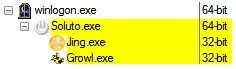
Process Explorer, a tool by Microsoft Sysinternals, can you show you that and much more:

enter image description here

This is also available for DLLs if you open the Lower Pane and set it to View DLLS with CTRL+D:

enter image description here

(Click image to enlarge)

Gaff
  • 18,569
  • 15
  • 57
  • 68
Tamara Wijsman
  • 57,083
  • 27
  • 185
  • 256
2

I had similar problems with JNI in the past too. For me, the solution was to find by hand location of equivalent 64bit dll and enter it into needed setting file.

Also make sure that you have installed 64bit JRE too (it should have been installed automatically with newest versions of JDK, but this doesn't happen on older versions of JDK).

AndrejaKo
  • 17,023
  • 20
  • 79
  • 128
  • 1
    I installed a 64-bit JDK just today and my JRE is for whatever reason 32-bit only. So I pointed to `jdk.../jre` in `eclipse.ini` and it works. Thank you. – maaartinus Mar 13 '11 at 18:16