36

There are times when the Firefox responds reluctantly. And it is not only when I have opened many tabs. But there are cases when I have opened as many as 20 tabs and Firefox is working fine and there are cases when I have opened just 5-6 tabs and Firefox behaves lazy.

So, I guess it do not depend on the number of tabs and there must be a specific tab which causes the problem. Isn't there a way to find that tab out and close only that instead of closing Firefox completely1? Is there an addon for that, or a script?

Peter Mortensen
  • 12,090
  • 23
  • 70
  • 90
Rakesh Juyal
  • 2,051
  • 7
  • 23
  • 26
  • 9
    This isn't a duplicate as this asks about CPU _and_ memory (the linked to question just asks about CPU). For **CPU** go to the page `about:performance` , for **memory** go to the page `about:memory`. – Matthew Wilcoxson Jul 11 '16 at 10:48

3 Answers3

13

Opening the browser to about:memory can show per-tab memory usage.

Further reading

Peter Mortensen
  • 12,090
  • 23
  • 70
  • 90
Jeff
  • 1,767
  • 2
  • 14
  • 21
8

For Firefox, I've made an addon which displays tab memory usage in the corresponding tab's title.

It provides user with tab related stats and memory usage...

https://addons.mozilla.org/firefox/addon/tab-data/

Screenshot

Features

  • How many tabs are currently open
  • How many tabs have been opened during this Firefox session
  • How many tabs have been opened since the addon was installed
  • Displays tab memory usage in title
  • Preference to toggle tab memory usage on/off
  • Preference to set interval between memory usage collection
Peter Mortensen
  • 12,090
  • 23
  • 70
  • 90
bobbyrne01
  • 209
  • 2
  • 5
  • 13
    Do you know ANY way to find out even a hint as to which TAB (or even relevant URL) is eating CPU? – tbone Mar 15 '15 at 17:54
  • Afraid I don't at the moment, but once I find out I plan on including that data in the addon too. – bobbyrne01 Mar 18 '15 at 17:56
  • I'll ask since you may have the knowledge....these various addons that "unload" tabs - in my experience, they seem to visually unload them, but Firefox doesn't give up any of that memory; or, when you restart Firefox, it seems to eat all of the memory required for the opened tabs, even before you click on each one and it loads (implying they are being physically loaded in the background, but not displayed). Would you happen to know if this IS in fact the situation? – tbone Mar 18 '15 at 20:28
  • 1
    @bobbyrne01 I am using your addon right now! Good stuff. – AntonioCS Sep 27 '15 at 21:47
  • @tbone `Firefox doesn't give up any of that memory`: Unless each tab is running in a separate process, I suspect this is a limitation of the operating system's memory management in that it won't "give back" the memory it uses (depends upon the operating system of course and also how Firefox itself handles memory). Check the [Electrolysis wiki page](https://wiki.mozilla.org/Electrolysis): *Theory*: If I am using Electrolysis, and I close a tab, I believe that should terminate the separate operating system "process" that houses that tab and its consumed memory. – bgoodr Mar 12 '16 at 18:18
  • @bgoodr I'm sorry but that idea that an application is literally unable to release memory is.....a bit hard to believe. – tbone Mar 13 '16 at 18:32
  • @tbone Let me clarify that when I said "give back": Applications can allocate and deallocate memory, but that does not necessarily mean that memory is immediately reused by the operating system for other processes memory needs. It may or may not depending upon how the operating system in question manages memory. Reference "high water mark" http://superuser.com/a/549692/106977 – bgoodr Mar 15 '16 at 03:14
  • @bgoodr I don't see the relevance of a "high water mark" of memory usage here. The point *I* am getting at is: why when using FF add-ons that claim to "unload" tabs (or when restarting FF and tabs are open but not "loaded") is that memory seemingly not freed up? – tbone Mar 16 '16 at 18:07
  • 3
    @tbone about:performance shows per-tab CPU usage. Matthew's comment on the main question covers this, but it doesn't show up as a reply here and is waaay underrated. – mgjk Nov 26 '16 at 13:52
7

The BarTab extension for Firefox (not available for the latest Firefox versions) might be useful for improving the situation:

BarTab can intercept when tabs are loaded in the background or restored after a browser restart and will only load the content when the tab is actually visited. It also allows you to free memory by unloading already loaded tabs, either manually or automatically.

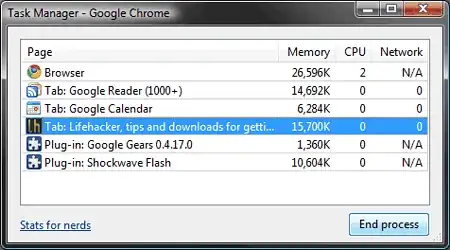
Otherwise, you might switch temporarily to Google Chrome, where Shift + Esc displays the per-tab usage:

Image

Peter Mortensen
  • 12,090
  • 23
  • 70
  • 90
harrymc
  • 455,459
  • 31
  • 526
  • 924