How can I hide the scrollbar of my iterm console?
Asked
Active
Viewed 1.6k times


1 Answers
47
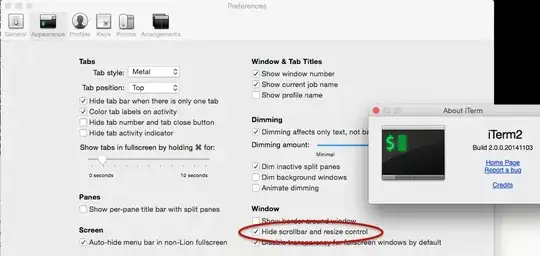
In iTerm's prefs menu/dialog:
iTerm > Preferences > Appearance > Window > "Hide scrollbar and resize control"

zabbarob
- 571
- 3
- 6
-
This is an old question and answer, but they did not implement this in iTerm2. – laebshade Mar 28 '15 at 13:11
-
They actually have implemented it. I've added a screenshot to make it more clear. – zabbarob Mar 29 '15 at 14:24
-
I must be using an old version at home; I see it at work but not there. I'll upgrade. Thanks for the screenshot! – laebshade Mar 30 '15 at 16:57
-
1In iTerm2 v3.x, this setting is in the same area of Preferences but is now called simply `Hide scrollbars`. – Taylor D. Edmiston Nov 16 '18 at 03:34