14

I'm using Windows 7 64-bit and have installed the latest Haali Media Splitter.

How can I make Windows Explorer show thumbnails for MKV files?

Gaff
  • 18,569
  • 15
  • 57
  • 68
Henry
  • 247
  • 1
  • 5
  • 18

5 Answers5

8

Icaros 1.2.5 works, if it doesn't work alone, install Shark007 Codec Pack!

http://www.majorgeeks.com/Icaros_d7220.html

http://shark007.net/

Henry
  • 247
  • 1
  • 5
  • 18
  • 1
    Confirming that Icaros 3.1.0 is working well on Windows 7. Just install, launch the (slick looking) configurator, replace the default set of filetypes with `mkv`, and click the 'deactivated' under 'Thumbnailing' to toggle it. Thumbnails will start being generated immediately. – James Oct 04 '18 at 21:26
3
  1. Go to the Haali Media Splitter Properties.

  2. Click the Options tab, expand Explorer integration and select Enable thumbnails extraction:
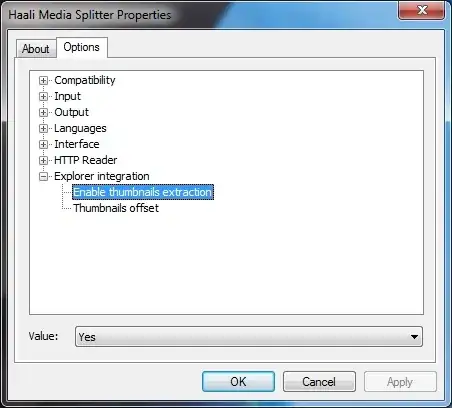
    Haali Media Splitter Properties

  3. Set the value to Yes. You might want to configure the Thumbnails offset (a milliseconds value) to say, 10000 to give you more representative thumbnails.

  4. Restart the machine.

Gaff
  • 18,569
  • 15
  • 57
  • 68
2

It doesn't seem to work at first with Windows 7 64-bit.

You need to add the following lines to the registry:

[HKEY_CLASSES_ROOT\.mkv\ShellEx\{BB2E617C-0920-11D1-9A0B-00C04FC2D6C1}] 
@="{c5a40261-cd64-4ccf-84cb-c394da41d590}"

[HKEY_CLASSES_ROOT\.mkv\ShellEx\{e357fccd-a995-4576-b01f-234630154e96}] 
@="{c5a40261-cd64-4ccf-84cb-c394da41d590}"

Curiously, a whole day after applying those changes, thumbnails for mkv files began to show up in Explorer, so it does work (with Haali MKV Splitter on Windows 7 64-bit systems).

Gaff
  • 18,569
  • 15
  • 57
  • 68
Realcool
  • 127
  • 4
  • where does `{c5a40261-cd64-4ccf-84cb-c394da41d590}` come from? Looking at my reg it's `{9DBD2C50-62AD-11D0-B806-00C04FD706EC}` for .mpg and .avi – Henry Sep 28 '11 at 21:25
  • tried both, restarted, they don't work... or maybe i really need to wait 'a whole day'? – Henry Sep 28 '11 at 21:58
  • wow, it works, but without offset it's kindda useless. 80% of them are just... black – Henry Sep 29 '11 at 06:24
  • Sadly I don't know how to change this. It seems use the same offset no matter what value I set in haali options. – Realcool Oct 09 '11 at 00:38
  • I think it stops working again, sad. – Henry Oct 09 '11 at 17:29
1

MediaPreview as suggested per lifehacker does a fine job, also for other formats such as ogg and 3gp.

Tobias Kienzler
  • 4,421
  • 7
  • 44
  • 76
0

It's problem caused by Windows 64 bit. Download K-lite Codec Pack for 64bit and everything works out fine. Tried. Note: Use it together with K-Lite Codec PAck for 32bit for best result.

Shinigamae
  • 101
  • 3