10

I want to apply conditional formatting on a sheet. I used to do Ctrl + A and then apply the formatting, but when i insert new cells or rows, this isn't included in the formatting. As you can see in the picture below, you have to give a range.

Conditional Formatting

Is it possible to give the entire sheet as range and how to do so?

Mehper C. Palavuzlar
  • 55,164
  • 49
  • 193
  • 250
Terry
  • 1,649
  • 3
  • 19
  • 24

2 Answers2

9

For MS Office 2007 and later, use

1:1048576

to select all cells in the entire worksheet.

For MS Office 2003 and earlier, use

1:65536

Mehper C. Palavuzlar
  • 55,164
  • 49
  • 193
  • 250
  • 2
    i thought there would be something like "worksheet" or something, but seems like there's not so i guess this will do. Thanks. – Terry Apr 29 '11 at 09:53
  • @djerry: You're welcome. If it was in VBA, there would be more options. – Mehper C. Palavuzlar Apr 29 '11 at 10:59
  • 1:1048576 means all rows from row 1 to row1048576. 1048576 is 2^20. – user674669 Mar 14 '16 at 00:55
  • 1
    I suggest using absolute references for this instead, so your formulas can be copy/pasted/filled. Otherwise you'll end up with a #REF! error when coping a formula using this trick to a different row. So the answer should read `$1:$1048576` and `$1:$65536` – rkagerer Nov 01 '18 at 06:32
6

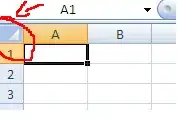
A quick hack is to click the space above the intersection between first row & first column when prompted for a range to apply to

Sathyajith Bhat
  • 61,504
  • 38
  • 179
  • 264