44

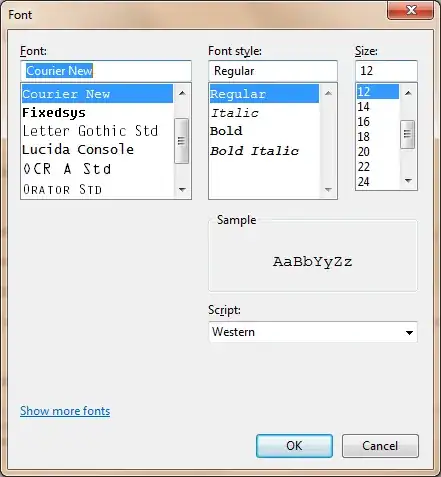
How can I change WinMerge font size and perhaps the font type?

Is it possible?

happy_soil
  • 2,411
  • 2
  • 20
  • 22
Junior Mayhé
  • 1,747
  • 2
  • 18
  • 27

2 Answers2

59

Click on View-> Select Font !

enter image description here

Junior Mayhé
  • 1,747
  • 2
  • 18
  • 27
  • Windows "clear case" to smooth fonts doesn't seem to work :-/ – Junior Mayhé May 11 '11 at 13:08
  • 1
    When you change the font like this you _might_ get a message that the active window will not be updated. Resolution: open it again. (Why I mention this is that if you just press Ok on the message you will not receive it again and a day later you will have forgotten it. And google. And find this comment.) – LosManos May 24 '16 at 07:33
  • 11
    Every time I set up WinMerge I need to search for this setting. I wonder why the font settings are not part of the WinMerge options found under "Edit" -> "Options". – Andreas Sep 28 '16 at 11:45
  • 2
    ...and again :((((((((( – Andreas Jan 17 '18 at 08:20
8

Did you try Ctrl + Mouse Wheel?

Mehper C. Palavuzlar
  • 55,164
  • 49
  • 193
  • 250