3

Is there a tool to do this? I don't fancy wading through 25GB manually!

I have found this, but it doesn't seem to work, or explain how to do what I need. If indeed it does provide the facility to scan a directory and move all the files about based on the tags, which is what I need.

bcmcfc
  • 601
  • 1
  • 10
  • 22
  • Any preferred OS? – Nifle May 30 '11 at 10:59
  • Well, preferably Windows but if there's an awesome Linux tool to do it (that can interact with an NTFS file structure on an external HD) than that'll do too. – bcmcfc May 30 '11 at 11:00
  • possible duplicate of [Automatically sort music files into folders by album/artist names](http://superuser.com/questions/171052/automatically-sort-music-files-into-folders-by-album-artist-names), and [How to organize music](http://superuser.com/questions/87792/how-to-organize-music) and [What is the best way to Organize MP3s, Photos and Videos?](http://superuser.com/questions/3711/what-is-the-best-way-to-organize-mp3s-photos-and-videos) and [Organizing tons of mp3's](http://superuser.com/questions/207258/organizing-tons-of-mp3s) – slhck May 30 '11 at 12:30
  • @slhck none of those Q/As appear to deal with the physical moving of files on the system to match the data gleaned from the tags. – bcmcfc May 30 '11 at 13:29
  • First question, first answer: "It can be configured to move files into a hierarchy based on their metadata", third answer: "for moving the files to the corresponding directories" – slhck May 30 '11 at 14:57

4 Answers4

3

I tend to use mp3tag for this - assuming the tags are correct, load them into the software, use the convert tag to filename option, and you can move it into folders by using wildcards - for example c:/music/%codec%/%artist%/%album%/

Picard is only useful if your tagging is totally messed up

Journeyman Geek
  • 127,463
  • 52
  • 260
  • 430
2

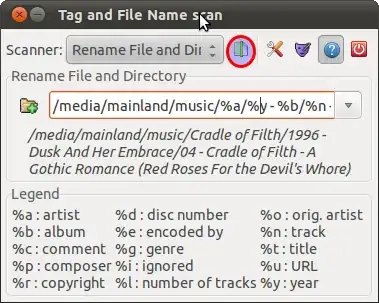
Try EasyTag. Works both on Linux and Windows. Here's what you should do:

  1. In Tree View on the left select your music directory and let it scan it.
  2. Select (with Ctrl+A) all files in File View. In right-mouse-button context menu select Scanner > Rename File(s) and Directory...
  3. Type in path to your music directory and the way you want your directories to be renamed.
  4. Press highlighted button on the picture below. Press Ctrl+S to apply changes.

Changes could be reverted with a usual Ctrl+Z.

In this example I rename everything to Artist/Year - Album/TrackNumber - Artist - SongTitle using this string: /path/to/library/%a/%y - %b/%n - %a - %t

enter image description here

skfd
  • 1,222
  • 2
  • 12
  • 15
  • 1
    Screen shot is no longer accurate (as per v2.2.5). I have the three buttons for "settings", "mask editor", and "legend", but neither the "power on/off" or the "document with green line" button. :-( I do have a "Scan Files" button, which seems to go through all my (35k) files but does not actually move/rename anything, so I don't know what it's supposed to be doing. – KlaymenDK Aug 01 '16 at 19:52
0

I've found an app for your exact need. It's called Tags 2 Folders. It's a very simple app and all it does is create folders and put your music in the order you want.

However, two words of caution.

  1. Your tags must be written well if you want it to be in the way you want your folders to look. This app isn't an all-in-one music organizing app thing. It reads metadata and sorts accordingly. As the developer said so himself "garbage in, garbage out"

  2. Apparently there is a problem with the albumartist tag for a few people while using it. It could be due to the version of tags used. All my tags were in ID3v2.3 format, and I found no such issues. Just informing before you take the leap.

I know the guy who asked the question did so 6 years ago, but hey, could help anyone passing by? Hope it helps!

av18
  • 1
-1

I've created tool related to this problem for that. Its not actually for that purpose, but someone might be interested. https://github.com/enomado/mus_renamer

  • 4
    Does it solve the question? If so, please expand your answer to explain how to use your tool to accomplish what was asked. If it doesn't solve the question, this isn't appropriate as an answer. – fixer1234 Jun 12 '15 at 14:34