1

How can one change the default focus for the open file dialog (Ctrl-O) thus that it directly jumps into the directory text field and not into the file name field?

In its default behavior it always focuses on file name, but this costs time.
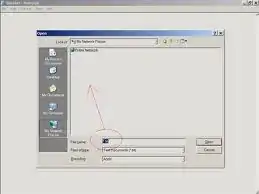
enter image description here

Is this just a problem in Windows or does every OS behave like this?

See also: related reddit link

Oliver Salzburg
  • 86,445
  • 63
  • 260
  • 306
user84628
  • 25
  • 3
  • 1
    Is this really a 'problem'? The file name combo is also a search box for files and directories, '..' to go up a directory, '\' to jump to the root etc. so it is quick and easy to navigate directly from this one box - in fact you can do _everything_ from this one box. Also ALT+i takes you to the directory drop down if you wish - but is this really any quicker? – MrWhite Jun 06 '11 at 14:39
  • I don't really understand your rant. If you know how a file is called why wouldn't you have the file name field focused first? – slhck Jun 06 '11 at 14:54
  • @w3d very helpful comment thank you very much(never had seen that there is a dropdown list, maybe i don't have one O.o? , one more question i tried to use the alt+i hotkey with notepad, where do i use it thanks – user84628 Jun 06 '11 at 21:28
  • 1
    @-.- You're welcome. You use the ALT+i hotkey in the Open Dialog to move focus to the "Look in" dropdown (notice the underline beneath the "i"). Alternatively if focus is currently in the "File name" box then you can press SHIFT+TAB to move focus back up to the file list (the area you are pointing to in your screenshot). You should also get a dropdown as you type into the "File name" (search) box. Try typing "C:\" and what do you get? – MrWhite Jun 06 '11 at 21:54
  • thanks, tried and worked, i never knew this hotkey do you have some extensive reference or link ? o|=|_ thx again – user84628 Jun 07 '11 at 15:23
  • @-.- This isn't really a special 'hotkey'. Notice the underline beneath the "i" in "Look [i]n". That tells you that pressing ALT+i will move focus to that control. Same for "File [n]ame", "Files of [t]ype" etc. In fact all Windows dialogs, menus and pretty much everything on Windows use this same system to aid keyboard users. I'm not aware of any definitive list of all these 'hotkeys' - there are just too many! – MrWhite Jun 08 '11 at 01:09
  • Slightly related: https://superuser.com/questions/442960/windows-7-explorer-keyboard-shortcut-set-focus-to-files-folders-content-area Most of the tips there using standard Windows keyboard shortcuts can be applied here as well. For Windows 7/8/10 the fastest seems to be pressing Shift+Tab twice. – stijn Mar 29 '21 at 08:42

0 Answers0