Is there any way to copy text that's shown in the Command Prompt window C:\Windows\system32\cmd.exe to the clipboard?
Asked
Active
Viewed 9,038 times
22

Pacerier
- 26,733
- 82
- 197
- 273
-
1nelaar's answer is the best way. – barlop Sep 16 '11 at 14:54
-
@barlop this is weird, it isn't working for me. take a look at the comments below it – Pacerier Sep 16 '11 at 15:52
-
ok I see nelaar got his instructions completely wrong, see my response below it with correct ones. – barlop Sep 16 '11 at 18:53
5 Answers
20
Right click on the title bar and go to edit menu
All the options you need are there (copy, paste, select)
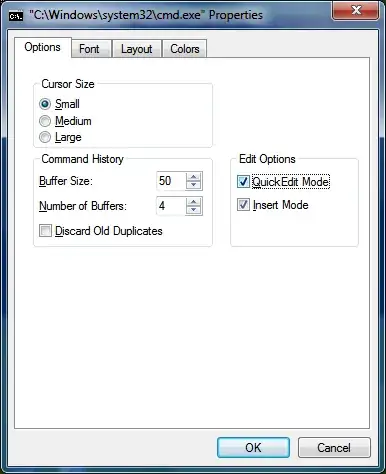
or To change the option to allow quick editing
Right click on the title bar and go to properties > quickedit mode enable.
Now you don't need to go through the edit menu to select or copy or paste.Enter short cut to copy
Right click short cut to paste
Left click drag to select text.
Every thing is put into a the system clip board so crtl + v will work in to other applications like notepad.


-
This is weird, I've got quickedit mode enabled but Ctrl+V isn't working. Netiehr is the press of the enter key doing paste.. – Pacerier Sep 16 '11 at 15:51
-
3@pacerier well, I see he got it wrong, but he's right about quickedit mode. Quickedit mode is great i'd use it always. Go into quickedit mode, then the way you copy is you highlight what you want to copy, it gets highlighted in a block. Then hit ENTER, then it unhighlights, and what you highlighted went into the clipboard. In order to paste, you right click. – barlop Sep 16 '11 at 18:52
-
-
@nelaar your answer is partly right and with wrong instructions, you shoudl clear it up. I upvoted it before I saw your instructions were completely off and now I can't remove that upvote I gave you. your answer is currently mostly a shambles. you should fix your answer. I suggest using
andto strikethrough parts and write the correct one. At least the comments to this answer explain everything. – barlop Sep 16 '11 at 19:27 -
@barlop. You guys were correct. I should have done a better job explaining, thanks for the input. I hope that my changes better explain what needs to happen and how it works. Just have to wait for it get reviewed before it shows up. – nelaaro Sep 19 '11 at 06:37
-
12
You need to right click and select Mark
You can then highlight the rectangle of text you want to copy.
Then hit Return to copy it into the clipboard.

ChrisF
- 41,278
- 17
- 101
- 154
-
1Right click, select Mark. Mouse cursor to beginning, left-click and drag to highlight text. Release left mouse button and then left-click in highlighted area. Highlight going away is text being saved to clipboard. It's all mousework. – Fiasco Labs Jun 12 '12 at 19:46
6
Enter marking mode: Alt+Space,E,K
(yes, these are just the hotkeys for the process described in nelaar's answer).Move the cursor with the arrow keys to the start of your selection (the selection is rectangular).
Hold Shift to select text while using the arrow keys to expand your selection.
Press Enter to copy the selection to the clipboard.


Oliver Salzburg
- 86,445
- 63
- 260
- 306
2
Right click and and select mark
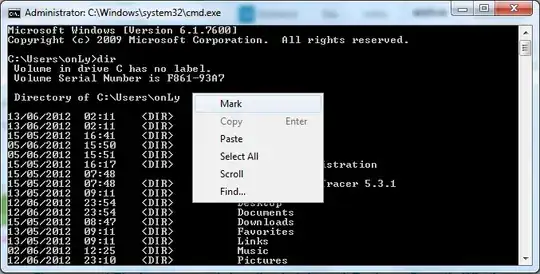
Block the text that you want to copy (by hold Shift key + bottom , top, right, or left)
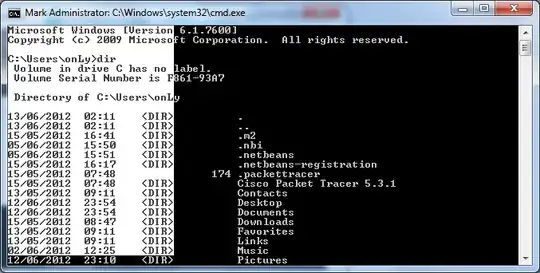
Press "ENTER"
- Paste it into notepad or other (MS. Word, Etc.).

TOFIK
- 122
- 2
- 12
-
1
-
that is clearly written and also in quickedit mode you can just drag across the screen with your mouse – barlop Jul 28 '15 at 20:32
0
I got Windows 10 Home. When I want to repeat (copy) a command or part of if I've written previously I just keep pressed the mouse left button to select the are I want to copy, release the button, place the cursor where I want to copy it and tap twice the mouse right botton and that's all, it is copied. That's on cmd.

Eliand Ly
- 1
- 1
-
You dug out a question for Windows Vista. Please verify tags before answering. – Destroy666 Apr 17 '23 at 03:09