9

Does anyone know how I can get Chrome to stop using my mouse buttons as hotkeys for a Logitech MX518 gaming mouse?

I have the mouse driver and software suite (SetPoint) installed. Unfortunately, SetPoint does not provide per-application settings, so that route is not an option.

No matter what I do in SetPoint, Chrome captures my side mouse buttons and uses them as a forward/back hotkey. I want to turn this off because I use those buttons for my push-to-talk in Mumble/Ventrilo.

Any idea how I can do this?

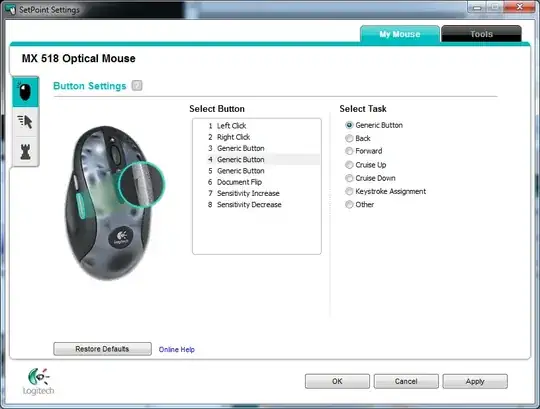
edit: my set-point does not have a way to create per-application settings. enter image description here
Robotnik
  • 2,390
  • 3
  • 23
  • 41
John Ruiz
  • 225
  • 2
  • 3
  • 10

4 Answers4

6

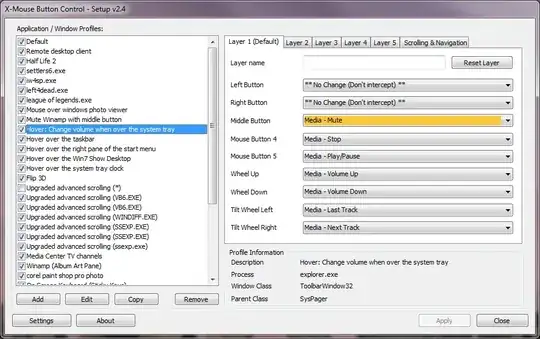
The free X-Mouse Button Control may work as a replacement for SetPoint, and I did see threads suggesting it for the Logitech MX518 mouse.

X-Mouse Button Control lets you bind buttons to keyboard keys on a per-application basis and has many optional settings.

Although I don't own your mouse, I use X-Mouse Button Control as a replacement for IntelliPoint and do highly recommend it. It may be worth trying.

image

harrymc
  • 455,459
  • 31
  • 526
  • 924
4

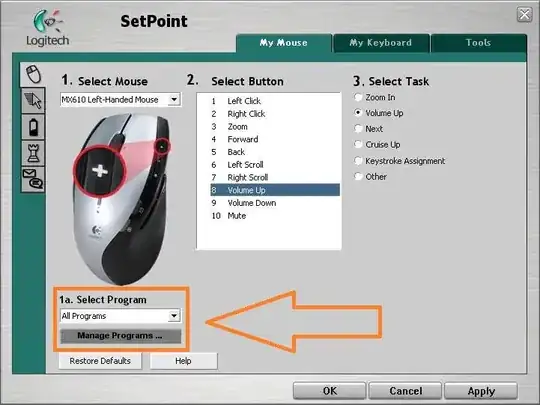
I could be mistaken, but setpoint DOES provide per-application setting...

set point image

You can consider, of course, Uberoptions to allow further customization..

bubu
  • 9,863
  • 2
  • 29
  • 44
2

I had this issue as well.

Within SetPoint:

  1. Select the side button that you want to be PTT (mouse 4 in my case)
  2. For the task select Other.
  3. In the dialog that appears, choose the function "Generic Button".
  4. Apply the changes and this will allow it to still work within Chrome as a back/forward button but also allows you to map it to PTT within Mumble.
Johan Lieu
  • 21
  • 1
1

By now, there is no Google Chrome internal setting to control the mouse keys behavior. The only way that I found that will work for sure is a autohotkey script that catches the button events and ignores them.

Michael K
  • 3,428
  • 4
  • 25
  • 44