3

In Chrome, when I click on a mailto: link, I'd like to be taken to my Gmail's Compose window. So I downloaded ChromeMailer and it works relatively well. However, after using Outlook 2010, the default for the mailto reverts to Outlook.

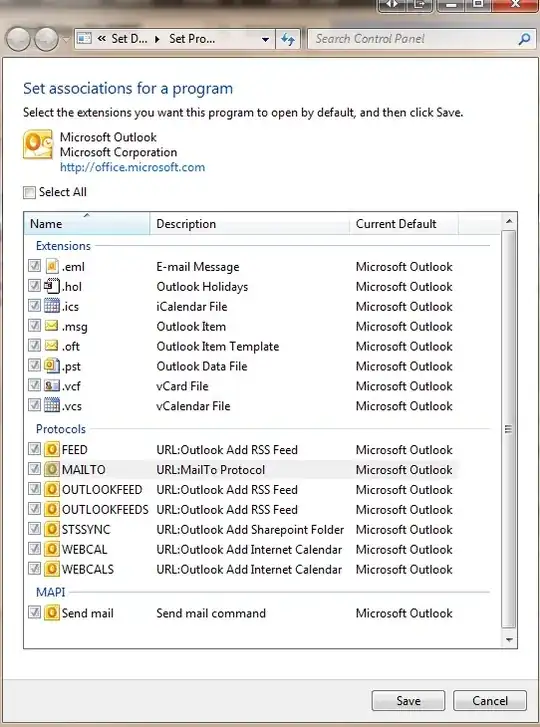
I went into Outlook's Options, clicked Default Programs... and was greeted with this:
enter image description here

As you can see, the checkbox is grayed out and I can't do anything to changed it. Clicking Select All checkbox does nothing either.

How do I stop Outlook from stealing the mailto protocol handler?

AngryHacker
  • 18,217
  • 67
  • 156
  • 209
  • (this is a joke, if you can't handle it, please, press ctrl+w) Go find developers that wrote outlook and harass them (legally) with [various gardening tools] to stop being [unflattering insults here]. PS - I find this very "interesting" behavior. Maybe you can write a script that's called as a scheduled task to assert the association you prefer. – James T Snell Jul 06 '11 at 20:55
  • This is probably because Outlook does not see any other programs on the computer for handling any of these types. – music2myear Jul 06 '11 at 20:57
  • 1
    @msuic2myear: I thought he said that the ChomeMailer established the mailto protocol default? Sounds like Outlook isn't asking before overwriting a default, which is my definition of political-programming. – James T Snell Jul 06 '11 at 21:10

2 Answers2

2

You can change the association of mailto in the registry by going to

HKEY_CLASSES_ROOT\mailto\shell\open\command

and change it from Outlook to Chrome composer

"C:\Program Files (x86)\Google\Chrome\Application\chrome" https://mail.google.com/mail/?=1#compose
Greg
  • 4,262
  • 2
  • 20
  • 19
2

If you only want to use GMail for the links in Chrome, the 'Send from GMail' extension works well for me on a machine that has both Outlook and Thunderbird installed.

Timo Geusch
  • 500
  • 6
  • 10