122

What are the best (i.e. bug free) Multi-tab command prompts in Windows?

They have them for Linux but Windows never seems to come out with one.

Ciaran
  • 4,485
  • 8
  • 30
  • 48
leeand00
  • 21,508
  • 43
  • 120
  • 182
  • "but Windows never seems to come out with one." That's because the console subsystem is a second-class citizen in Windows, at least in terms of window interaction and UX. – afrazier Apr 14 '11 at 03:55
  • @afrazier I should would like to know why, it's so much more powerful than a GUI. – leeand00 Apr 14 '11 at 11:55
  • Here's a [thread on StackOverflow](http://stackoverflow.com/questions/60950/is-there-a-better-windows-console-window/10904494#10904494) – Casebash May 08 '14 at 06:02
  • 2
    Windows Terminal is on preview and available now. I learned about options here that seems to have more features. https://www.microsoft.com/en-us/p/windows-terminal-preview/9n0dx20hk701?activetab=pivot:overviewtab – Ricardo Jan 18 '20 at 14:46

11 Answers11

149

Sorry for the self-promotion, I'm the author of another Console Emulator, not mentioned here.
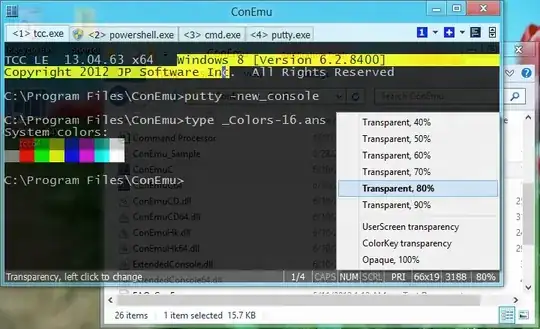
enter image description here

ConEmu is opensource console emulator with tabs, which represents multiple consoles and simple GUI applications as one customizable GUI window.

Initially, the program was designed to work with Far Manager (my favorite shell replacement - file and archive management, command history and completion, powerful editor). But ConEmu can be used with any other console application or simple GUI tools (like PuTTY for example). ConEmu is a live project, open to suggestions.

A brief excerpt from the long list of options:

  • Use any font installed in the system, or copied to a folder of the program (ttf, otf, fon, bdf)
  • Run selected tabs as Administrator (Vista+) or as selected user
  • Windows 7 Jump lists and Progress on taskbar
  • Integration with DosBox (useful in 64bit systems to run DOS applications)
  • Smooth resize, maximized and fullscreen window modes
  • Scrollbar initially hidden, may be revealed by mouseover or checkbox in settings
  • Optional settings (e.g. pallette) for selected applications
  • User friendly text and block selection (from keyboard or mouse), copy, paste, text search in console
  • ANSI X3.64 and Xterm 256 color
  • Quake/Tilda style
  • Change cursor position in command prompt (cmd, powershell) with mouse click (build 120618+)
  • Works on Chinese editions of Windows :)

Far Manager users will acquire shell style drag-n-drop, thumbnails and tiles in panles, tabs for editors and viewers, true colors and font styles (italic/bold/underline).

Try it. You may read some comments on StackOverflow.

Maximus
  • 20,637
  • 16
  • 91
  • 116
52

Check out Console.

Console is a Windows console window enhancement. Console features include: multiple tabs, text editor-like text selection, different background types, alpha and color-key transparency, configurable font, different window styles

Tamara Wijsman
  • 57,083
  • 27
  • 185
  • 256
th3dude
  • 9,441
  • 6
  • 47
  • 67
  • 2
    The issue I had with Console is that sometimes (read: Many) when minimized it wouldn't restore properly. – Nate Aug 27 '09 at 14:41
  • 5
    Didn't the OP mention "bug-free"? Last I looked Console was pretty horribly in that respect. – Joey Aug 27 '09 at 15:43
  • 4
    Yes,it's trully horribe...and all editions of this software are marked as beta. – Jichao Nov 04 '09 at 01:11
  • It does not work well on my windows xp(chinese edition) – Jichao Nov 04 '09 at 01:14
  • 7
    I tried to use Console2 (last release dates 2011) to run Cygwin 64 bits in my Windows 7 64 bits desktop and it didn't work. Researching a bit I was able to find [ConsoleZ](https://github.com/cbucher/console) which is a fork of the former that is properly updated and was able to support the environment I described. – Chuim Dec 04 '13 at 22:36
  • Console2 sometimes hide the last row from my view. And I can't figure out how to mark and copy in Console2! – Phuah Yee Keat Jun 04 '14 at 07:28
  • This one is way better than Cmder which eat a lot of RAM and is slow – Marcelo Dec 11 '18 at 14:17
  • Can it save its state? – Aftershock Mar 28 '20 at 07:28
16

I realize this is 6 years after you posted the question. I've found PowerShell ISE to be an elegant solution.

There's a slight 2 second delay to start it up, but it's incredibly powerful and suitable as a tabbed command prompt in a Windows 7/8/10 environment.

It has a cleaner UI than many of the alternatives listed above, and it's built for PowerShell.

HSuke
  • 511
  • 1
  • 4
  • 10
9

PromptPal is the best I have ever used.

Taptronic
  • 1,091
  • 5
  • 14
  • 25
7

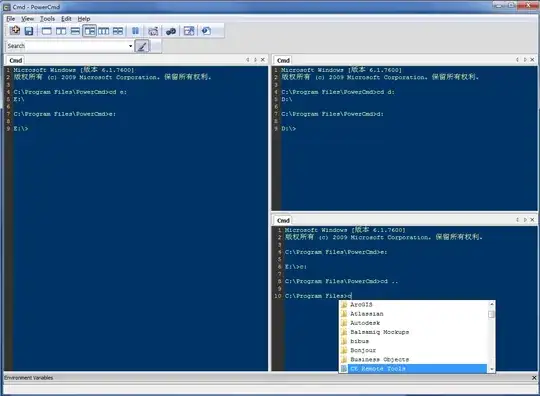
I think PowerCmd is a nice multitab cmd prompt software as well. It is shareware and has all the features I expected.

You can get it from http://www.powercmd.com/ enter image description here
xiao
  • 179
  • 1
  • 5
  • That looks pretty cool xiao. I'll have to check that out. Thanks! – leeand00 Apr 11 '11 at 12:12
  • NOTE: It's not free! It's a shareware. where did you get a free version? – Mason Zhang Apr 13 '11 at 14:10
  • 2
    I just wanted to note that I have been using PowerCMD for a year and it is extremely buggy. A lot of interactive programs like irb, p4, php etc do not run properly and cause you to have to close out. It also constantly spits out the system environment variables. It's very annoying and I am uninstalling as I type this. –  Aug 01 '11 at 13:55
  • He asked for BUG free. Not necessarily MONEY free....... – Taptronic Jul 06 '12 at 13:48
  • I confirm this is the easiest to install and quickest to get you started (tested console and conemu but either they don't ahve installer and second needs extra setup before the can run) – Abdessamad Idrissi Apr 30 '14 at 10:37
  • Doesn't work with python interactive shell. – Amit Tomar Apr 12 '17 at 08:42
6

What about cmder? It seems to be very popular.

Anton Kalcik
  • 181
  • 1
  • 6
5

My recommendation (favorite commands is a killer feature):

ColorConsole

Features:

  • Favorites commands
  • Export to HTML and RTF
  • Copy,Paste,Cut...
  • Customizable font style and color
  • Tabbed working with multi cmd.exe.
  • Fast folder switch.
  • Portable

alt text

Gaff
  • 18,569
  • 15
  • 57
  • 68
  • @Molly Exporting as HTML! That is a sweet feature! – leeand00 Aug 27 '09 at 15:52
  • I'm going to have to give that a try. – leeand00 Aug 27 '09 at 15:55
  • Not really good: 1) TAB key autocompletion doesn't work anymore (it works with Windows 7's `cmd.exe`) 2) Try BACKSPACE key: it will even erase the prompt `C:\Windows>` etc. I didn't go further but it seems that there's lot of little UI oddities. – Basj Jan 23 '18 at 15:55
  • holy shmoly nothing beats this! – N_E Dec 19 '21 at 02:06
5

I recommend MobaXterm: it is a bash command prompt for Windows packaged in a multi-tab terminal with a lot of extra features (SSH, macros, bookmarks and much more).

Didier
  • 1,159
  • 10
  • 6
4

Windows native tab support will be released hopefully with 2018 fall Windows update.

Tabbed console support

nkef
  • 553
  • 4
  • 5
4

Windows Terminal and Windows Terminal Preview are distributed by Microsoft, so they are really worth mentioning.

For Windows Terminal or Windows Terminal Preview:

  1. Open Windows Store
  2. Search for Windows Terminal, or for Windows Terminal Preview
  3. Install

For me, the installation didn't work (I think because my pc is not connected to a Microsoft account), so I went to Microsoft's Github and installed the lastest release from an .msi:

  1. Go to https://github.com/microsoft/terminal/releases
  2. Download the latest release's .msi
  3. Click it to install

Bonus - Add to Context Menu:

If you want to add Windows Terminal or Windows Terminal Preview to the context menu, use the PowerShell script linked in this StackOverflow great answer.

HeyJude
  • 280
  • 2
  • 13
2

I recent but very mature already entrant to the Windows Consoles arena is Babun https://github.com/babun/babun It works similar to what you would find in a Bash-based console on a *nux machine but on any Windows OS, as a big plus all the familiar tools as ls, find, grep and more are there.

Arthur
  • 179
  • 1
  • 2
  • While this looks like a good tool, the question asked specifically about a multi-tab command prompt. It doesn't look like Babun supports tabs. I downvoted this answer as it does not answer the question. I'd be happy to remove my downvote if Babun does in fact support tabs. – Matt Jan 28 '18 at 21:55
  • This project is also discontinued! – Dwza Apr 17 '19 at 08:30