35

I have a Windows 2008 server with various software packages installed on it.

I want to know what network shares my server is sharing (and I want to know that from within the server, not by trying to access the shares from another computer).

Does anyone know how to do that?

Hennes
  • 64,768
  • 7
  • 111
  • 168
lisa17
  • 1,209
  • 4
  • 19
  • 27
  • 1
    Possible duplicate of [Is it possible to see all shared folder list in windows?](https://superuser.com/questions/414798/is-it-possible-to-see-all-shared-folder-list-in-windows) – StayOnTarget Nov 27 '17 at 16:14

5 Answers5

43

Start -> Run -> compmgmt.msc -> OK.

Computer Management (Local) -> System Tools -> Shared Folders -> Shares.

This will show you all the current shares on the system as well as allow you to control them, change permissions, modify access, etc.
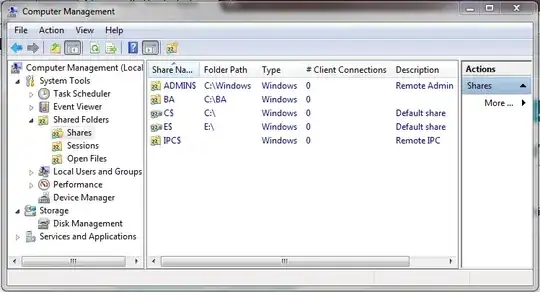
enter image description here

UPDATE: PowerShell offers another way to quickly get all SMB shares on localhost for Windows 7/Server 2012 and later hosts:

PS D:\> get-smbshare

Name   ScopeName Path       Description
----   --------- ----       -----------
ADMIN$ *         C:\WINDOWS Remote Admin
C$     *         C:\        Default share
D$     *         D:\        Default share
E$     *         E:\        Default share
IPC$   *                    Remote IPC
music2myear
  • 40,472
  • 44
  • 86
  • 127
20

From a command prompt, enter the command:

net share

This will show all shares on the system, including hidden.

Gaff
  • 18,569
  • 15
  • 57
  • 68
Atom Smasher
  • 201
  • 1
  • 2
14

From the Command Prompt you can type:

net view \\servername /all

This should show you all shares on that server even if they are hidden shares.

Gaff
  • 18,569
  • 15
  • 57
  • 68
Sean Ciminello
  • 141
  • 1
  • 2
  • Hey dude, THANK YOU!! I was desperately searching for a mechanism for getting list of connected machines and the shares they exported. I wish I found this little comment a week ago. – Edwin Clement Feb 13 '23 at 11:55
6

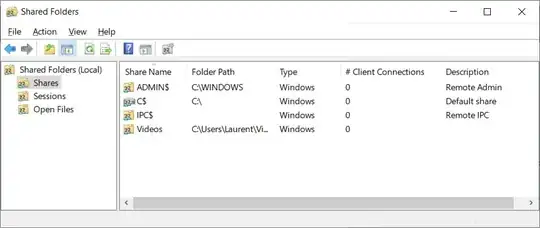
A bit simpler than the accepted answer is direct call to the Shared Folders console: Start > Run > fsmgmt.msc

Screenshot of the Shared Folders console

Toto
  • 17,001
  • 56
  • 30
  • 41
2

start > run

\\127.0.0.1

will do the trick

PLEASE NOTE THIS WILL NOT SHOW HIDDEN SHARES.

squareborg
  • 2,425
  • 2
  • 19
  • 27