In Windows Chrome, alt + d is the shortcut.
What is it in Mac Chrome?
Asked
Active
Viewed 5.9k times
135

Felipe Augusto
- 115
- 6

js_
- 1,473
- 2
- 9
- 5
-
1Superior answer here with info on discovering and remapping these keys: https://apple.stackexchange.com/questions/11573/chrome-keyboard-shortcut-to-go-to-address-bar – Eric Leschinski Aug 28 '19 at 02:33
4 Answers
197
Chrome support has a list of shortcuts for the Mac version. You will find the ⌘-L shortcut will perform what you are trying to do.
For Windows Chrome, you can also use Ctrl-L and F6 to highlight the address bar.
Felipe Augusto
- 115
- 6

Druckles
- 2,147
- 1
- 13
- 10
-
-
2
-
1
-
-
-
-
2
-
1
-
-
@m_gol I figured out why it doesn't work. Slate titling window manager was occupying that shortcut. – Oct 28 '16 at 02:43
-
-
@VladimirVukanac in my case, I need to press F6 two times. First press focuses on the first tab. – Roman Luštrik Apr 21 '19 at 13:14
-

1
The keyboard shortcut ⌘L focuses the address bar / search bar / omnibox.
Note that the menu text for this command is:
File > Open Location...
This menu text can be used in System Preferences to bind a different keyboard shortcut.

pkamb
- 4,175
- 3
- 36
- 48
0
This has worked fine for me:
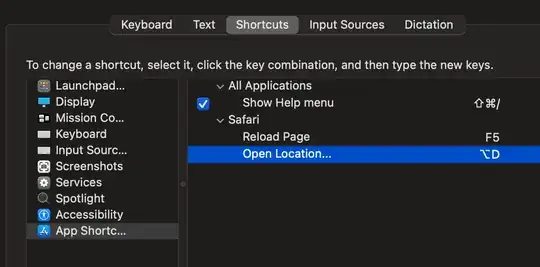
I tried Open Location, Open Location... and then File > Open Location... which didn't work
However when I tried Open Location... again it worked
I should say I first assigned the function to a single key such as f10 and checked this worked before trying to get alt + d to work specifically
This was done on Big Sur OpenCore

Donald Duck
- 2,473
- 10
- 29
- 45
