I'm using Windows 7 Enterprise and I need to turn off the Automatic Updates feature, but don't know how.
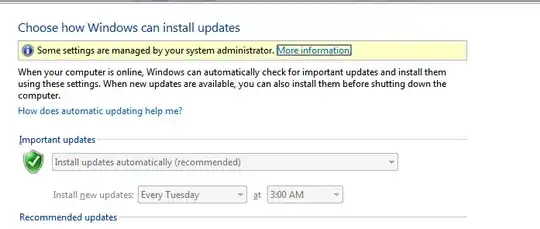
The "Change Automatic Updates Setting" has been deactivated with a greyed out look, as seen in the attached screen capture:

I'm using Windows 7 Enterprise and I need to turn off the Automatic Updates feature, but don't know how.
The "Change Automatic Updates Setting" has been deactivated with a greyed out look, as seen in the attached screen capture:


Yeah, you are on a domain. You'll need to have a chat with who ever sets the Group policy in your Domain.
I have the same thing and I have domain privileges.

Type: “regedit”
Hit Enter
Go to:
HKEY_LOCAL_MACHINE\SOFTWARE\Policies\Microsoft\Windows\WindowsUpdate\AU
Find AUOptions. You can change the values from 1 through 5.
1. Download updates but let me choose whether to install them
2. Check for updates but let me choose whether to download and install them
3. Download updates but let me choose whether to install them
4. Install updates automatically
5. Enable the option box to choose manually
(source http://mkncreations.com/site/2012/09/fix-windows-7-update-settings-disabled-grayed-out/)
