7

There is a "$REYCLE.BIN" folder in my external hard drive; can I delete it?

What do I need to do?

  • I believe this folder is the storage location for files in the recycle bin. It is likely that this file is locked by Explorer, therefore you can not remove it directly, you may possibly be able to remove it by emptying the recycle bin. – Crippledsmurf Jul 23 '11 at 09:57
  • Yes, you can delete it. Unless you might want to recover files that have been deleted from that drive. – Cody Gray - on strike Jul 23 '11 at 09:59
  • 1
    The recycle bin shouldnt be taking *any* space on your hard drive. Regardless of how big the size of the data is in it, Windows marks that space as free. Are you looking at its size with something other than windows explorer? – Keltari Jul 29 '14 at 00:02
  • @Keltari, What do you mean? It should show the size of the folder right? – Pacerier Apr 25 '15 at 16:46
  • That there are files in the recycle bin is perhaps/probably relevant when cloning the drive. Not sure. – Pablo H Jul 01 '22 at 14:14

2 Answers2

2

Personally I would not delete it, I would just disable it for that drive. It won't hurt to have on empty hidden folder on your drive.

Right click on Recycle Bin>Properties and highlight the drive. Then change the "Settings for selected location" to "Don't move files to the Recycle Bin. Remove files immediately when deleted."
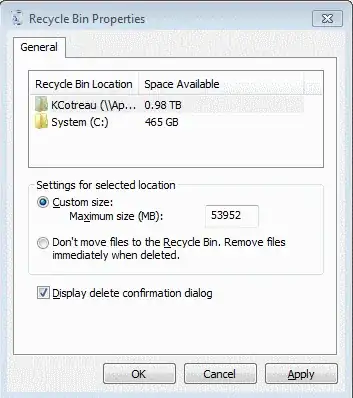
enter image description here

KCotreau
  • 25,519
  • 5
  • 48
  • 72
-1

When you delete file from your external hard drive, it's been gone to some hidden place in your external hard drives. $REYCLE.BIN folder in this circumstances may be the folder contains those files or links to those files. If you can see some files in this folder, I suggest do not delete it. Delete it may be a harmless action, but we don't need to do that, right?

user297826
  • 107
  • 2