2

Possible Duplicate:
I accidentally plugged my USB mouse into my eSata port… it works?

My father bought a nice USB-gadget for me and wanted to demonstrate it to me. So he plugged it in as I wasn't at home. Unfortunately he has plugged it into the eSATA-jack and not into the USB-jack. I didn't see it for quite a while and the gadget and the notebook was running fine for hours (although the USB-gadget was plugged into eSATA).

Does anybody know if this can be done without being potentionally harmful?

(I'm very astonished that it hasn't done harm and even more surprised as it has worked. Pressing plugs into jacks which shouldn't be put there feels wrong to me.)

Martin Thoma
  • 3,384
  • 9
  • 31
  • 65

1 Answers1

12

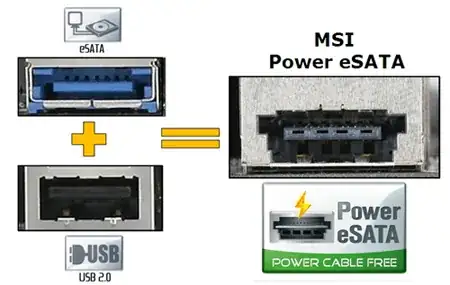
I believe that most of the newer eSATA jacks also act as USB jacks. On my Dell E6400 that is the case. The shape of the opening is slightly different to accommodate both.

http://en.wikipedia.org/wiki/ESATA/USB

enter image description here

Gaff
  • 18,569
  • 15
  • 57
  • 68
DavidGrove
  • 302
  • 1
  • 4
  • 9
  • 1
    +1 Excellent answer, I did not even know they existed. That would explain why it worked in the first place as I was scratching my head on that one too, at first. http://en.wikipedia.org/wiki/ESATA/USB#SATA-IO (search combo). – KCotreau Aug 01 '11 at 22:53
  • Whoa! Never seen one of those before. – Brad Aug 01 '11 at 22:56
  • Yup, the Dells have had this for a couple of years now. – surfasb Aug 02 '11 at 00:06