3

I'm pretty sure I have some sort of virus or just some program that wants to install itself. However, I can't figure out what it is and my Windows 7 AV (MSE) doesn't find anything on scans...

Once in awhile, maybe once every two days, an installer window appears:
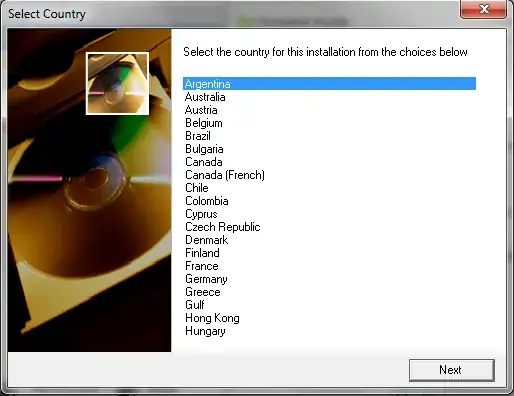
Installer

I never hit Next, but instead close it (I'm afraid to hit Next)

Anyone seen this before or know what it could be? Couldn't really find anything about it with Google. Nothing with it gives any clue as to what "program" it wants to install...

I would like to avoid running a system restore unless its possible for me to restore to factory defaults on a single partition, aka without bombing my entire Linux ecosystem living on the second half of the hard drive. I don't have any files that aren't backed up on some repository somewhere, so if push comes to shove, I'm fine with just reinstalling Windows 7 (via restore partition or the DVD I burned of it, since my laptop provider did not supply me with an installation disk...) to get rid of the darn thing.

UPDATE: Seems related to Sony VAIO. Process name varies and seems somewhat generic/random.

mathepic
  • 233
  • 1
  • 3
  • 14
  • It's probably NOT a virus/malware (they tend to try and hide). Have you checked the Task Manager when this window opens up to try and figure out what the process is that's showing it to you? My guess (by the picture) is that it's some bloatware your notebook OEM included, probably something to do with your optical drive (LightScribe installer? Drive firmware updater?). – Ƭᴇcʜιᴇ007 Aug 09 '11 at 19:14
  • @techie007 I've checked the application but not the process, I think. The application name was very generic. Right now I'm wondering if Steam (which was installed on my laptop by a family member) is trying to reinstall itself after I removed it. – mathepic Aug 09 '11 at 19:15
  • Again, malware almost NEVER tells you it's running, and certainly doesn't care what language you speak. I'd say stop being a chicken and hit [next]. :) – Ƭᴇcʜιᴇ007 Aug 09 '11 at 19:18
  • @techie007 I've had it for several months and the problem only recently started occurring as well. The whole "generic name" thing is what makes me think that its something shady. Usually the installer has a name like "_____ Installer", not "Installer" – mathepic Aug 09 '11 at 19:19
  • @techie007 Just because you happen to believe it is not a virus doesn't mean you should change my tags. Title change is fine, as is the capitalization change on Linux. – mathepic Aug 09 '11 at 19:22
  • 1
    do you have a iso file mounted or a cd/dvd in the drive? – N4TKD Aug 09 '11 at 19:24
  • @JohnDR No. (char limit) – mathepic Aug 09 '11 at 19:24
  • Honestly, even if its not a virus, the thing is annoying enough to want to get rid of. – mathepic Aug 09 '11 at 19:28
  • Is there a way to view process history? I would like to look up the filepath of the process of the application and compare with paths found in autoruns – mathepic Aug 09 '11 at 19:36
  • @mathepic - I did it because you haven't provided any evidence it is a virus (so far everything you've provided, aside from your suspicions, points to it NOT being a virus). – Ƭᴇcʜιᴇ007 Aug 09 '11 at 19:36
  • @techie007 And that kind of content is appropriate in an answer. You don't see people on stackoverflow going and editing the wrong code _in the answer_, do you? – mathepic Aug 09 '11 at 19:38
  • Anyhow... if you think it's a virus, perhaps check out [What to do if my computer is infected by a virus or a malware?](http://superuser.com/questions/100360/what-to-do-if-my-computer-is-infected-by-a-virus-or-a-malware) – Ƭᴇcʜιᴇ007 Aug 09 '11 at 19:40
  • My Windows 7 equipped Vaio (Model: VPCEB) has been doing the same thing. I haven't let it move past that screen either. –  Aug 09 '11 at 19:44
  • I'm running a Vaio as well. Hmm. Model PCG-61611L – mathepic Aug 09 '11 at 19:45
  • Update: Skyped with a friend complaining about the problem. He had a Vaio, same issue. Only happened once for him so far. – mathepic Aug 09 '11 at 19:52
  • The process on mine was called GLBD129 and mine happened three times. Random timing. –  Aug 09 '11 at 19:52
  • I might see if I can get into Tech Support and verify with Sony what this is. Doubt that I will get anything good out of that, but its worth a try I think. – mathepic Aug 09 '11 at 19:53
  • Important - Google-ing "vaio select country installer" gives http://esupport.sony.com/US/perl/swu-download.pl?mdl=VPCCW21FX&upd_id=6405&os_id=45, which implies this might just be an update. Its download uses a generic name... – mathepic Aug 09 '11 at 20:15
  • I have the same problem on my computer. It kept on popping up, day after day, and I kept on alt-f4'ing it. Eventually I got sick of it, and chose my country, and hit next. There was one more page, I got through it, and nothing happened. The 'Select Country' still pops up every day. –  Aug 16 '11 at 16:54
  • Its a sony updater. I had the window twice before it finally went away. (Once to update the updater, once to update Vaio Care) – mathepic Aug 16 '11 at 16:59

1 Answers1

2

Okay, figured out what it is. If you go to Vaio Update -> Check For Updates, it reveals that Vaio Update itself must be updated. If you click to update it, you get the Select Country screen. It looks like the screen is safe.

"I have been having this issue for weeks unwilling to hit next and just ran vaio update and this is definitely a VAIO update."

mathepic
  • 233
  • 1
  • 3
  • 14