When I try setting up Google Talk in Pidgin. I get the message:
Unable to Connect
EDIT:
(I have it working in Digsby fine)
Here is my setup:
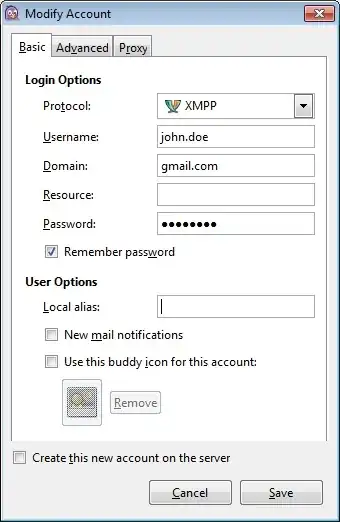
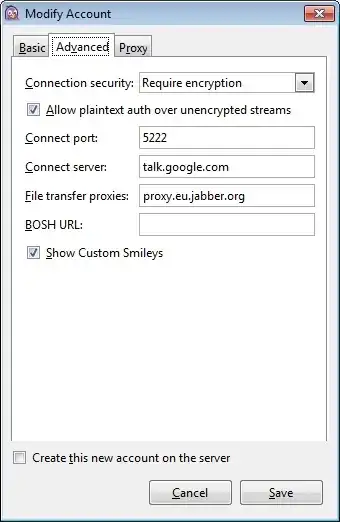
When I try setting up Google Talk in Pidgin. I get the message:
Unable to Connect
EDIT:
(I have it working in Digsby fine)
Here is my setup:

Google created the new Google Hangout, that replaces also Google Talk, and seems that XMPP support has been removed.
But there's a partial solution: enable access to Gmail from "less secure apps" and Pidgin will connect to it.

I used:
in the Basic Tab:
Protocol: XMPP
Username: myusername (without @mydomain.com)
Domain: mydomain.com
Resource: (left this blank as default)
Password: mypassword
Checked Remember password
in the Advanced Tab:
Connection security: Require encryption
Connect port: 5222 (default)
Connect server: talk.google.com
If your account uses Two-Factor Authentication, generate an app password and use it as the password.
I had to use Pidgin version 2.10.9, with the following settings:
Protocol: XMPP
Username: <Gmail user name> (without @gmail.com)
Domain: gmail.com
Resource: <blank>
Password: <app-specific password>
Remember password: Checked
In the Advanced Tab:
Connection security: Use Old-style SSL
Connect port: 443
Connect server: talk.google.com
File transfer proxies: proxy.eu.jabber.org (the default)
I'm not sure why I needed a different port than the other answers. Because I use two-factor authentification, or am behind a corporate firewall?

Add a pidgin account
That's it! There is no step 3!

Pidgin comes preconfigured with an option in the drop-down menu called "Google Talk", which has all the settings already done. Type in your username/password and you should be able to connect.

Update:
Doesn't work since Google has disabled XMPP support.
Gtalk is not working now, so I'm using pidgin now, and it's working great
Setting I've used:
in the Basic Tab:
Protocol: XMPP
Username: yourUsername (without @mydomain.com)
Domain: mydomain.com
Resource: (left this blank as default)
Password: yourPassword
Checked Remember password
in the Advanced Tab:
Connection security: Use Old-style SSL
Connect port: 5223 (there would be 5222 change it)
Connect server: talk.google.com

You want to include your full domain in the username field, for example john.doe@gmail.com (which is needed for Google Apps accounts). You can leave the "domain" field blank.
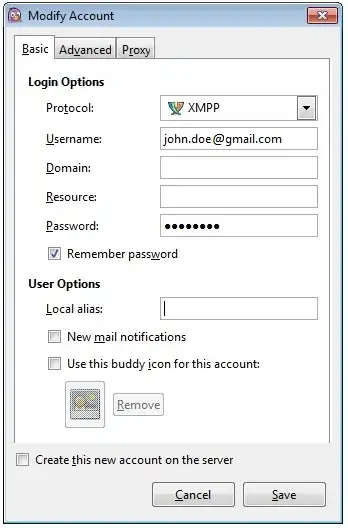


for me this helped:
Connection security: Use encryption if available.
Connect port: 5222
Connect server: talk.google.com
Also in Resource I entered "Home"

I tried every method, same issue. The below settings fixed it:
Basic Tab: Protocol: XMPP Username: username (without the @gmail.com) Resource: Empty Password: Yourpassword
Advanced Tab: Connection security: Use encryption if available Connect server: talk.google.com File transfer proxies: empty (delete whats here)
Save, click enable check box.
You need to set app-specific password for Pidgin. Just follow the instructions at this link.


