0

Occasionally I'll stumble upon a website that pops up one of those annoying dialogs. [Using IE 9 with block popups (medium) configured] enter image description here
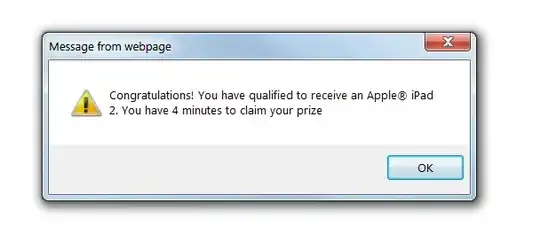
As long as the dialog is open I can't navigate away from the page. At this point I usually choose to kill the IE process in Windows Task Manager. Since IE attempts to auto-recover stuck tabs I sometimes find myself in an endless loop.

  1. Dialog pops up.
  2. Open task manager
  3. Find and kill the iexplorer.exe process
  4. IE detects that the tab died, and reloads the page.
  5. Dialog pops up again.

I can stop the loop by logging off the computer.

Is there a way to stop this auto-recovery of the annoying page?

Walt Ritscher
  • 221
  • 1
  • 7
  • 1
    you would give up a free iPad? – Keltari Aug 27 '11 at 22:07
  • Have you tried closing the dialog? – u1686_grawity Aug 27 '11 at 22:18
  • Sounds like you may be infected already....http://superuser.com/questions/100360/what-to-do-if-my-computer-is-infected-by-a-virus-or-a-malware/157533#157533 – Moab Aug 28 '11 at 00:14
  • Try an IE reset, go to Control Psnel > Internet Properties > Advanced Tab and hit the reset button, you might have a misbehaving or malicious add on. – Moab Aug 28 '11 at 00:15
  • @Moab: Erm... Read my answer, proof me otherwise. – Tamara Wijsman Aug 28 '11 at 00:16
  • malware cannot inject script into the browser? Its a long shot I know. – Moab Aug 28 '11 at 01:44
  • As an aside, if this were a popup that were being shown again and again and again when closing it: modern browsers often offer a checkbox "Don't show additional dialogs for this page" when that happens. – Arjan Aug 28 '11 at 13:22

2 Answers2

1
  1. Just click OK.

  2. Hold CTRL+W simualtaneously to close the current tab.

  3. ???

  4. Profit! The web page has been closed. You haven't been infected...

Why?

Take a good notice at the screenshot.

Now read the text of the question How to edit a JavaScript alert box title?.

As you can see, this dialog box is generated using JavaScript and isn't malicious:

<script language="JavaScript">alert('Congratulations! You have qualified to receive an Apple&reg; iPad 2. You have 4 minutes to claim your prize');</script>

Putting the above code in a web page causes the exact same behavior.

If it were possible to infect your computer by clicking on the message box, you would actually have already been infected as you need to bypass all security to fake such message box. Unless you were to load in a Java, Flash or Silverlight plug-in (which are pretty safe these days); or downloading a file you would never ever have to accept a consent prompt to allow malware to run.

So, next time you see this, don't be afraid...

Tamara Wijsman
  • 57,083
  • 27
  • 185
  • 256
0

Go to Internet Explorer's options and under advanced options, there should be an automatic crash recovery option.

Turn that off.

enter image description here

surfasb
  • 22,452
  • 5
  • 52
  • 77