3

Does anyone know a software to easily design electronic / electrics circuits (for resistors, capacitors, inductors, sources, transistors, ...) which already has a large and easy-to-use "library" of images / objects?

If possible, it should be following the EU representation schema.

I already had a look at WikiProject Electronics/Programs but – frankly speaking – I did not manage to install the Inkscape library and other programs were a bit too hard for the (little) work I had to do.

In the end I had to work with DIA (a diagram program for Linux), and copying/pasting resistor & capacitor images, I would not like to do that again.

Linux compatibility would be a plus.

user51166
  • 698
  • 2
  • 8
  • 14

3 Answers3

2

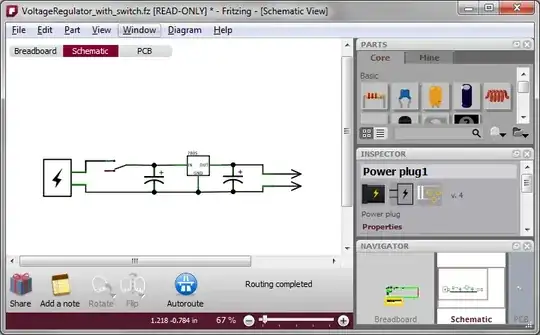
Fritzing is a cross-platform electronics prototyping application. It supports editing circuit designs in three views: breadboard, schematic, and PCB.

Breadboard view:

Fritzing breadboard view

Schematic view:

Fritzing schematic view

PCB view:

Fritzing PCB view

sblair
  • 12,617
  • 6
  • 48
  • 77
  • Very good call ! Even the breadboard design might be a plus ! Is the components library complete enought and / or extensible ? Are components symbols in the EU norma available (resistor as a rectangle and capacitor as 2 parallel straight lines) ? – user51166 Sep 06 '11 at 04:50
  • @user51166 Yes, you can [add components](http://fritzing.org/learning/tutorials/creating-custom-parts/), or make modified versions of existing components. Each component has a different image for each of the three views. For example, a resistor in PCB view is a rectangle, and a ceramic capacitor in schematic view has two straight lines. If you wanted, you could override any of these images. – sblair Sep 06 '11 at 09:26
  • Very cool thanks. If you have other related programs to suggest please do ! – user51166 Sep 06 '11 at 11:11
  • ooh, its a lot more mature than i remember – Journeyman Geek Sep 06 '11 at 11:56
1

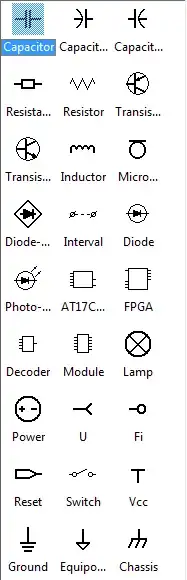
It is not a linux app, but will likely work fine in WINE. The program is called CADE, it is a vector editor, similar to Visio, and has built in images for electrics, network diagrams, flow charts and many more topics. It is drag and drop for the image library (which you can customize if you wish as well). You can also customize the labels for the images easily. Bonus, it is freeware.

Here is a screen shot of the image library for electrics:

cadeelectricsimages

MaQleod
  • 13,149
  • 4
  • 40
  • 61
  • It has a basic library. Is it extensible (i.e. by using svg images or other components found on the internet). Is it free (CADE not CADE PRO) for student use ? Thanks – user51166 Sep 06 '11 at 04:48
0

If you're running a Debian distro (Ubuntu, Linux Mint, Elementary OS, etc.) just type circuit in your package manager (Synaptic, or Software Center) and you will lots of software for that purpose. If you don't, I just did and came up with: Electric, Fritzing, GEDA, kicad, & xcircuit. There are also test programs like Easyspice, gnucap, ngspice, qucs, & tkgate; and pcb programs like Eagle, & pcb (Fritzing, GEDA, & kicad also have PCB features. There are also programs for calculating various things like smith charts, etc, VLSI design & manufacture, rom programming, etc. That's probably far more than you need, but it's better to have it and not need it than to need it and not have it.