9

I am looking for a way to switch my user agent in Chrome.

I have tried User-Agent Switcher for Chrome with only limited success. I really want more user agents, and the ability to add new agents with different operating systems.

Are there other ways of changing Chrome's user agent?

nc4pk
  • 9,037
  • 14
  • 59
  • 71
daviesgeek
  • 1,619
  • 7
  • 22
  • 34

3 Answers3

12

I'm not aware of any extensions that allow you to input a custom string, however you can specify a custom user agent on the program's command line.

Right-click Chrome's shortcut and select properties, then add the --user-agent switch to the command.

e.g.:
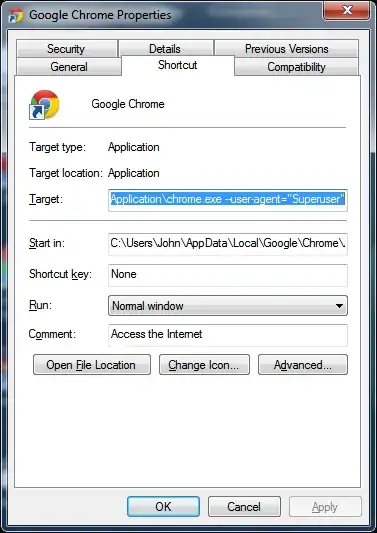
enter image description here

From a website's perspective ( www.useragentstring.com ):
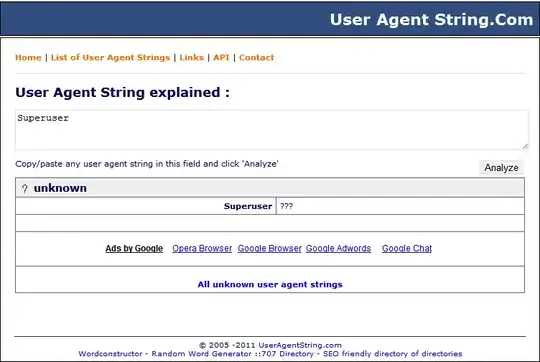
enter image description here

Google Chrome has no API that allows you to modify the HTTP headers as of yet, so extensions rely on the Javascript method. Any website that parses the agent from HTTP headers will see past that extension anyways. This may be one of the reasons a developer has not spent time creating a user agent switcher that allows custom agents.

John T
  • 163,373
  • 27
  • 341
  • 348
4

On OSX you can launch from command line like this.

/Applications/Google\ Chrome.app/Contents/MacOS/Google\ Chrome --user-agent="Mozilla/4.0 (compatible; MSIE 8.0; Windows NT 6.0; Trident/4.0; Molla/4.0 (compatible; MSIE 6.0; Windows NT 5.1; SV1) ; .NET CLR 3.5.30729)"
Nate Bunney
  • 141
  • 3
  • Could please you cite a reference that has a list of the user agents? – daviesgeek Sep 16 '11 at 04:21
  • Sure: http://www.useragentstring.com/pages/useragentstring.php – Nate Bunney Mar 21 '12 at 10:54
  • Thanks for posting that link! Can you please summarize it in your answer, because link have a tendency to disappear over time, leaving your answer irrelevant and not helpful to those who may find your answer down the road. Thanks! – daviesgeek Mar 21 '12 at 17:20
-1

Google chrome has apparently removed the command line flags in the most recent versions and the only way it will allow you to switch user agents is via ctrl + shift + i or using an extension.

For what reason I do not know why they removed functionality that is useful for developers/pentesters/security analysts.

music2myear
  • 40,472
  • 44
  • 86
  • 127
linuxgeek
  • 1
  • 1