22

I have a dual monitor setup, I also like to use the Windows + D keyboard shortcut to bring the desktop into view. When I use this shortcut the windows open in both monitors minimize and the desktop is shown.

Is there any way to have only the active monitor show the desktop and have the other window keep all its windows as they were?

slhck
  • 223,558
  • 70
  • 607
  • 592
Jake
  • 221
  • 1
  • 2
  • 3

3 Answers3

10

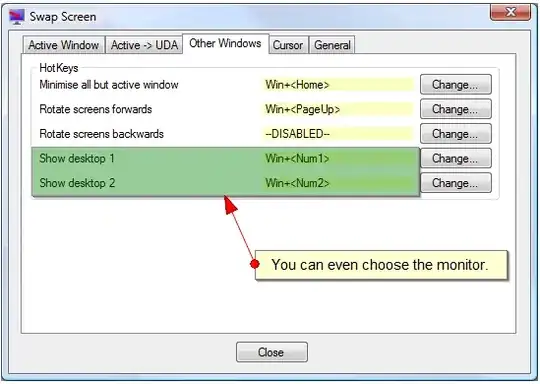
It is possible for free. Swap Screen is very simple program to do that. You have to define other shortcut than win+d, but I still find it convinient enough. For example I bound alt+1 to show desktop 1, alt+2 to show desktop 2.

Additionally, this program have some other neat features. One that I find myself using daily is function to move windows to another monitor with a shortcut, then there are sticky cursor and plenty other features. Swap Screen is a part of DualMonitorTools, free set of tools for multiple monitors that can provide even more functionality.

Here is the screen:

swap screen

LeBaux
  • 166
  • 1
  • 6
3

If you have UltraMon you can easily do this with a Hotkey. In the Options menu simply go to the Hotkey tab and scroll down to the option Show the desktop on monitor with mouse and assign any key combo that you'd like.

enter image description here

quickcel
  • 4,779
  • 2
  • 24
  • 25
1

I don't believe there is a built-in way to do what you ask. The best tools for managing multiple monitors appears to be UltraMon and DisplayFusion. They are not free, but a quick look through the features and it appears DisplayFusion may do what you are looking for.

uSlackr
  • 8,955
  • 31
  • 48