6

In support of a remote end user, I need to walk them through adding a trusted root certificate to their computer's "Computer Account".

This is no big deal, except this user is running Windows 7 Home Premium; I believe this version of Windows 7 does not allow access to MMC.

How can I add/manage certificates without MMC access?

Gaff
  • 18,569
  • 15
  • 57
  • 68
Erick
  • 161
  • 1
  • 1
  • 2
  • 1
    Does it allow you to start premade consoles? (If the built-in `certmgr.msc` works, you can make a `systemcertmgr.msc` on your own machine, [then upload it somewhere](http://ompldr.org/vOTZkZQ/syscertmgr.msc).) – u1686_grawity Sep 12 '11 at 23:19
  • MMC is available in **all** editions of Windows. All those MSC files aren't executing by themselves. – surfasb Sep 13 '11 at 04:40
  • is there a .msc for managing the "Computer Account" certificates? Is there a way to run an .msc as another user, the "computer account" user in this case? – Erick Sep 13 '11 at 19:53

2 Answers2

7

Go to Control Panel (icon view) > Internet Options > Content Tab > Certificates button > Trusted Root Certificate tab

Then use the import button.

. enter image description here

.

Depending on the format of the certificate the user may need to select the proper certificate type from the drop down box before it can be seen.

. enter image description here

.

Moab
  • 58,044
  • 21
  • 113
  • 176
  • This only manages the user's certificates, not the "computer" account. While it allows installing root CAs to the "Local Machine" store, and would probably work for this particular question, it doesn't do exactly the same thing. – u1686_grawity Sep 12 '11 at 23:26
  • You are right, I just checked a PC I imported, I had to do it while logged into each account, thanks. – Moab Sep 13 '11 at 01:09
3

Instead of doing it for only the computer account, you can install the CA system-wide:

  1. Double-click the .crt file and click "Install..." (or use Moab's method of opening the Certificate Manager and click "Import")

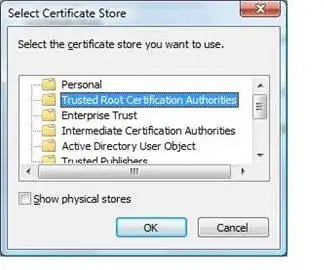
  2. In the wizard, when prompted to choose the install location, enable "Show physical stores" and select Trusted Root Certificate Authorities → Local Machine.

"Select certificate store"

(Actually I'm not sure if computer account vs "Local Machine" makes any difference for trusted CAs. It's different for "personal" certificates, though.)

u1686_grawity
  • 426,297
  • 64
  • 894
  • 966
  • Can you do it ***programmatically*** using _certutil_ command for add certificates *.cer into **Trusted Root Certification Authorities** and **Intermediate Certification Authorities** ? – Kiquenet Apr 21 '16 at 09:43