4

I found two C# text mate bundles.

My questions are

  1. What is the "official" C# text mate bundle?
  2. If csharp-tmbundle is the only one to use for C#, how can I install it without the .tmbundle format?
slhck
  • 223,558
  • 70
  • 607
  • 592
prosseek
  • 5,794
  • 21
  • 59
  • 78
  • Answer added for Textmate 2 below (just so people don't assume from the earlier answers to this question that it still requires extra work to keep things up to date. – tim Mar 30 '13 at 21:25

2 Answers2

4

There are two ways to install. Note that .tmbundle is actually just a folder. But there's an easy way to install it over the GUI.

… using GetBundles

Use GetBundles, which is a meta-bundle for installing third party bundles. It lists all "official" and third party bundles for TextMate.

Open Terminal.app and enter:

mkdir -p ~/Library/Application\ Support/TextMate/Bundles
cd !$
svn co http://svn.textmate.org/trunk/Review/Bundles/GetBundles.tmbundle/
osascript -e 'tell app "TextMate" to reload bundles'

Then, find GetBundles under your Bundles menu. Here, you can select the C# bundle from GitHub:
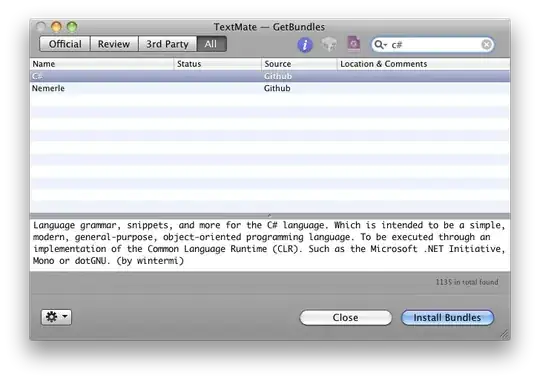
enter image description here

… straight from the Git source

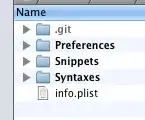
There's a wiki entry on the GitHub page, which says the following commands are necessary to install the bundle:

mkdir -p /Library/Application\ Support/TextMate/Bundles
cd /Library/Application\ Support/TextMate/Bundles
git clone https://github.com/wintermi/csharp-tmbundle csharp.tmbundle
osascript -e 'tell app "TextMate" to reload bundles'
slhck
  • 223,558
  • 70
  • 607
  • 592
  • +1 Just what I was looking for. I did run into an error trying to run that apple script though. Strange error, "no suitable image found". Anyhoo, if anyone else gets that, just go to TextMate >> Bundles >> Bundle Editor >> Reload Bundles. Same thing, just less geektastic as the apple script. – Stephano Jan 10 '12 at 01:54
0

Grab the free Textmate 2 upgrade from TM1 and take advantage of its built-in bundle management

tim
  • 409
  • 3
  • 6