4

When Windows 7 power management turns off my monitor after the set time, it starts repeatedly playing the "Device Disconnected" sound. I know Windows is playing this sound because it no longer senses the connection the monitor, as it would with any other device being disconnected. The problem is the monitor is turned off purposely to conserve energy, so the sound should not play continually.

Do not want to change sound for "device disconnected" to "none" becuase it is used for other device disconnect notifications.

Search of MS Knowledge Base was not helpful. Also did not see any posts here which were specific enough to this. I have checked every setting I can find in Windows. Any suggestions how to get this to stop playing the sound when the monitor goes into energy save?

Update: In the event viewer there is a fatal error in Widows Desktop Manager during all of this. After further investigation is appears to be a known Windows issue; http://answers.microsoft.com/en-us/windows/forum/windows_7-desktop/the-desktop-window-manager-has-encountered-a-fatal/ae44c9ea-3b52-451d-a371-91ae375ce353. At this point there doesn't seem to be an answer.

CharlieRB
  • 22,566
  • 5
  • 56
  • 105
  • Some monitors use basic communciations on the VGA cable. When the monitor goes to sleep it sends Going to sleep over vga.. then Windows has a bug and sends wake up.. continious loop. This could also be the case in HDMI. Try to change the driver of your actual screen (not gfx card) to some other generic(or find your model maybe on the manufactures site) and see what happens. Also you could try changing VGA Sleep modes in BIOS. – Piotr Kula Oct 04 '11 at 12:52
  • I take it that you have done tests to confirm that it is indeed related to the monitor going into standby right? For example, you’ve manually put the monitor to sleep and found it still makes the noise? Does the sound occur just once each time the monitor shuts down or repeatedly? – Synetech Aug 08 '13 at 01:57
  • @Synetech Yes, it's definitely related to the monitor going into standby. There are other PCs of the same model (all installed at the same time) in our office which do the exact same thing. This appears to be a default setting of some sort. I'm starting to think its related to digital monitors, since these are all DVI. – CharlieRB Aug 13 '13 at 12:25
  • `The problem is the monitor is turned off purposely to conserve energy, so the sound should not play continually.`   Does the sound occur just once each time the monitor shuts down or continue in a loop after it has turned off? – Synetech Aug 13 '13 at 15:39
  • Ever found the solution to that problem @CharlieRB ? I'm experiencing the exact same issue... – OcuS May 26 '17 at 18:44
  • Unfortunately, no. The only thing I could do as a work around, back when I asked this question, was to disable turning off the monitor in the power save settings.This leaves the monitor on all the time, so I enabled the screensaver. Since there have been so many updates since, I will enable it again and see if it still does the same thing. Thanks for the reminder. I will let you know. – CharlieRB May 26 '17 at 21:45
  • @OcuS I just tested this. It no longer makes the noise when the monitor is put into standby. Sorry to say, I have no idea when the problem was resolved or what resolved it. I am making the assumption a Windows Update in the last few years, since I asked, has taken care of it. – CharlieRB Jun 02 '17 at 14:17
  • @PiotrKula Thanks the advice! I had exactly the same issue on a Windows 10 machine, with display port connection to the monitor. I checked the Device Manager, and it was using a "Generic PnP Monitor" driver. I went to MSI:s homepage (the manufacturer of my monitor). There, I searched for the model name of my monitor and could find a downloadable driver and instructions how to install it. With the MSI driver, the issue of periodic disconnect sounds has dissapeared. – Alderath Mar 20 '20 at 19:52
  • still happens in HDMI with Windows 11 – Leandro Bardelli Apr 10 '23 at 23:46

1 Answers1

-1

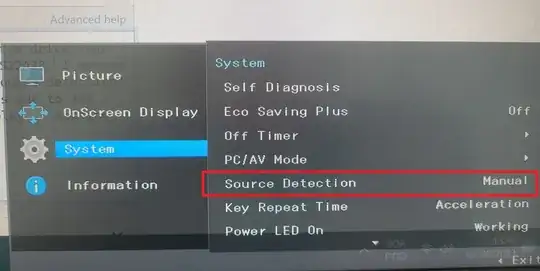
I just solved this exact problem in my pc. It's not a driver nor windows issue, it's a setting from the monitor. Mine is Samsung S22A33. I opened the menu from the button of the panel, found an option called "Source detection" and set it to "Manual". The sound of device turning off and on is due to its function of keeping searching automatically for a source to display... setting it manual makes it stop and it's working fine now.

Photo of System>Source Detection menu

Greenonline
  • 2,235
  • 11
  • 24
  • 30
Diego
  • 1