17

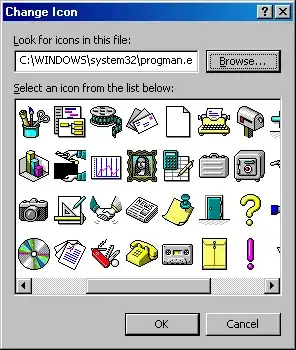
In the old Windows 3.1 days I had an icon of an expressive and very good pixel-art reproduction of DaVinci's Mona Lisa portrait. I'd like to have this icon again, but I couldn't find it anywhere. Which .DLL file was it located in? The icon looked like this:

http://www.studiolo.org/Mona/MonaIcon.gif

I checked into moricons.dll and some other files from the Windows 3.11 distribution, but still couldn't find it.

RedGrittyBrick
  • 81,981
  • 20
  • 135
  • 205
user539484
  • 460
  • 5
  • 15

2 Answers2

22

It looks like the icon is in progman.exe, the Program Manager executable file. In Windows XP, you can still find the icon in %SystemRoot%\system32\progman.exe...

Program Manager icons

After rediscovering this, I think I remember that when you manually created a shortcut in Program Manager, the icons embedded in progman.exe were provided as default choices, or you could click a Browse button to open another .ico or .dll file like moricons.dll. But it's been so long ago, I don't have a copy to play with to confirm, and haven't been able to find information about it online.

Bavi_H
  • 6,610
  • 26
  • 27
  • 2
    +1 and I remember this being the default set of icons too. – Randolf Richardson Sep 30 '11 at 00:43
  • 2
    I notice the Windows XP version is slightly different (dark yellow for the frame, instead of the original bright yellow; dark green grass instead of bright green). I think I remember these changes were introduced in Windows 95. If you ever used the Mona Lisa icon in Windows 3.1, you may remember the icon looked too bright compared to other icons. – Bavi_H Sep 30 '11 at 01:33
  • Thank you very much! I was examining files with "additional" icons, and completely forgot what in Windows 3.x Program Manager had extensive set of addtitional icons too! And you are completely right on default icon choices - `moricons.dll` has "more icons" in addtion to icons in `progman.exe` – user539484 Sep 30 '11 at 01:40
  • 1
    Yes, exactly, 3.11 have brighter icon than XP, – user539484 Sep 30 '11 at 01:59
11

Although I don't remember which .DLL this image is from, in the hopes of solving your problem I've taken your image and converted it with Adobe Photoshop (and one other proprietary command-line tool called "PNG2ICO") to a .ico file for you. You can download it from here:

  enter image description here
  Mona Lisa icon file (2,238 bytes)
  http://www.lumbercartel.ca/images/interesting/monalisa.ico

Thanks for that nice trip down memory lane!

Randolf Richardson
  • 14,634
  • 39
  • 52