4

Does anyone know what "\?\Volume...." is or why it would be listed as a disk on the windows defragmenter?

defragmenter

drives

drivemanag

It is not listed on other defragmenters like defraggler.

The E: and F: drives are mirrors.

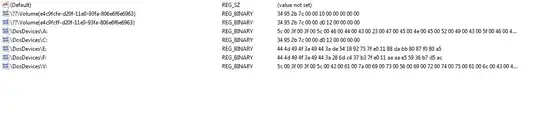
Listing for HKEY_LOCAL_MACHINE\SYSTEM\MountedDevices\ . There were many other entries with similar naming but they were removed after using the application suggested by Psycogeek.

reg

I removed the keys as Psycogeek suggested but they repopulated as a different alphanumeric string labelled as "Never run"

defrag2

Judith
  • 673
  • 4
  • 18
Riguez
  • 3,744
  • 2
  • 23
  • 30
  • Only other thing listed is the small Windows 7 system partition. – Riguez Oct 02 '11 at 16:48
  • Nothing shows up.. from what I remember it has pretty much been there since a clean install. On top of that I am ridiculously careful about controlling what gets installed on my system. Almost everything runs virtualized and I am using Bitlocker with a TPM which was activated before I even used the system and the TPM has never been triggered. – Riguez Oct 02 '11 at 17:55
  • It doesn't show up on the drive but it is listed in the registry under.. HKEY_CURRENT_USER\Software\Microsoft\Windows\CurrentVersion\Explorer\MountPoints2\CPC\Volume\{e4c9fcfe-d20f-11e0-93fa-806e6f6e6963} , HKEY_LOCAL_MACHINE\Microsoft\Dfrg\Statistics\Volume{e4c9fcfe-d20f-11e0-93fa-806e6f6e6963} , HKEY_LOCAL_MACHINE\SYSTEM\MountedDevices\ and HKEY_USERS\S-1-5-21-199.......\Software\Microsoft\Windows\CurrentVersion\Explorer\MountPoints2\CPC\Volume\{e4c9fcfe-d20f-11e0-93fa-806e6f6e6963} – Riguez Oct 02 '11 at 19:19
  • I assume that if I delete the key listed under HKEY_LOCAL_MACHINE\SYSTEM\MountedDevices\ which has the exact same name and reboot it will disappear... would still like an explanation of why it would show up under defragmenter like it does. – Riguez Oct 02 '11 at 19:42
  • It could be a USB device or a any other volume that has been mounted by Windows, or malware created it, not sure if it is safe to delete or not. – Moab Oct 03 '11 at 02:22
  • Nothing is connected.. I deleted the keys and it recreated them with a different string as shown in the screenshots – Riguez Oct 03 '11 at 03:11
  • Either installed software or malware is re-creating the key...http://superuser.com/questions/100360/what-to-do-if-my-computer-is-infected-by-a-virus-or-a-malware/157533#157533 – Moab Oct 03 '11 at 03:45
  • Check my edit to my answer below, it may be related to a TPM chip if you have one, – Moab Oct 03 '11 at 03:57
  • It *is* the small Windows 7 system partition. Since you already knew this I don't know why this thread even exists. – qasdfdsaq Jun 10 '15 at 13:25

5 Answers5

4

HKCU\Software\Microsoft\Windows\CurrentVersion\Explorer\MountPoints2\CPC\Volume\

USB devices that have been attached, appears safe to be removed, see more information link below.

Source

.

I also found this response

thats were the boot loader goes, its so u can encrypt the whole partition but that is unencrypted so the boot loader can that then get to the windows boot in the partition since the loader in the 100MB can pull the key from your TPM chip and you can use the encrypted drive.

Moab
  • 58,044
  • 21
  • 113
  • 176
  • I do have a TPM active.. guess that's what is making it show up in the defragmenter. – Riguez Oct 03 '11 at 04:32
  • @Moab the link with more information went away and I could find a good equivalent or a cached document, also I found that modifying registry keys didn't have any effect in Windows 10. I found qasdfdsaq's very useful, but trying to improve it I ended up writing my own answer. (Since reputation points don't seem to be a big issue for you, would it be possible for you to remove your answer?) – LiveWireBT Jul 31 '15 at 16:55
2

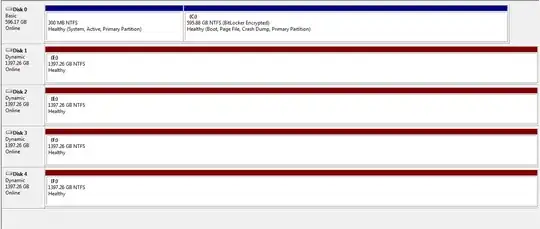
It's the un-named 300MB partition without a drive letter on disk 0. It's displayed as its volume GUID because it doesn't have a name or drive letter to display instead. On most stock installs this would be labelled "System Reserved".

Certain programs (such as R-Studio) will happily list the GUIDs of every volume, partition, and drive graphically should anyone else be confused by hidden boot partitions in future.

qasdfdsaq
  • 6,621
  • 1
  • 26
  • 37
  • Confirmed, you can find the same partition UUID that Defrag shows also in Linux under `/dev/disk-by-partuuid` and labelling the partition in Gparted as e.g. "System Reserved" makes it show up as such in Defrag. Problem solved, volume no more "unkown" to me. – LiveWireBT Jul 31 '15 at 15:10
1

http://www.uwe-sieber.de/drivetools_e.html#drivecleanup find the Drivecleanup here. then run it with the -T option, that will show you what it thinks is orphaned. Might be a safer way of removal. (as long as the programmer knew what he was doing :-)

after all the discussion , I was wondering if it was a "virtual" drive that was once mounted, or a USB booting, where the USB was enabled for booting in the bios.

Psycogeek
  • 8,945
  • 6
  • 51
  • 74
  • I ran the program and it removed records of a large number of devices including the one listed but the volume is not only still listed under the windows defragmenter but it is also still listed under HKEY_LOCAL_MACHINE\SYSTEM\MountedDevices\ ... there were like 30 entries under this with similar names but the application removed them and left it alone along with one other similar key. – Riguez Oct 02 '11 at 20:36
  • dang, that leaves chuck it and reboot and see if it comes back. i have not got that far with win7, but none of the locations you point it at are critial, it is not in my system, and it was not in the microsofts MVP system when he showed his. – Psycogeek Oct 02 '11 at 20:47
  • **Listing for HKEY_LOCAL_MACHINE\SYSTEM\MountedDevices\** **This looks very bad to remove those , from that location.** Ohh crud, i think you could lose boot. – Psycogeek Oct 02 '11 at 21:13
  • I deleted all the registry keys that had the string in it and rebooted.. but the keys were repopulated with a different string and the entry is still listed under the defragmenter. I edited the OP with a screenshot. – Riguez Oct 02 '11 at 21:24
  • lol bit late on telling me not to remove it – Riguez Oct 02 '11 at 21:25
  • Ok, the normal HKLM MountedDevices location would be a critical location. so through the process of Elimination (cause you eliminated everything) its either a baddie, or has something to do with dynamic disks. – Psycogeek Oct 02 '11 at 21:45
  • It was not listed in the defragmenter on my last install... and I seriously doubt its malware. – Riguez Oct 02 '11 at 21:51
  • I am not helping this question out. A mapped network drive? what is Inside the Key for it ? – Psycogeek Oct 02 '11 at 22:23
  • Have not mapped any network drives :\ – Riguez Oct 02 '11 at 23:04
0

Try clicking Start, then type cmd then choose Run as Administrator.

Type vssadmin delete shadows /all then click ENTER. It should remove shadow copies.

galacticninja
  • 6,188
  • 16
  • 78
  • 120
TxTrapper
  • 9
  • 1
  • 2
    The author solved this question 4 years ago. You might want to provide more information on the command itself. – Ramhound Jun 10 '15 at 12:35
0

To extend on qasdfdsaq's answer, the ID you are seeing should be the GUID of one of the system partitions that Windows creates. Any other partition should be displayed as usual with its label and drive letter. Look at the table in the Wikipedia article if your ID matches to one of these and you have an exact answer.

I would expect that these are already filtered out to not show up in Defrag at all and may be that is the problem here that this is a generated GUID which is not blacklisted in Defrag. You can leave this as it is or just label the partition in Powershell or a partition manager that can access it to make it look nicer. Defrag shouldn't be able to accidentally work on this partition anyway. If you don't have a lot of disks and partitions and you don't want to be overly accurate then just pick any name for the label, otherwise open diskmgmt.msc or run get-partition in Powershell and look at the types. I was able to identify mine as Recovery.

If that's not accurate enough for you, because you have a lot of partitions, then you need a program or code snippet that displays the partition UUIDs/GUIDs for each partition to make an exact association which GUID maps to which partition number and how it is used in Windows. Unfortunately I don't know of a free and quick solution to that on Windows. (In Linux I can look these up with ls under /dev/disk-by-partuuid.) Scratch that, Windows calls it DeviceID, just replace the GUID below with yours and your label of choice.

$guid = "12345678-abcd-abcd-abcd-1234567890ef"
$label = "System Recovery"

$drive = Get-WmiObject -Class win32_volume -Filter "DeviceID = '\\\\?\\Volume{$guid}\\'"
Set-WmiInstance -input $drive -Arguments @{Label="$label"}
LiveWireBT
  • 904
  • 2
  • 7
  • 34