3

One day out of nowhere, my Dell Studio 1747 laptop started detecting two display devices: One Generic PnP Device and another Generic Non-PnP Device.

I don't have two devices so how is it detecting another device?

The strangest part is that the virtual monitor is connecting and disconnecting itself, and my display keeps on switching from extended display to normal display to duplicate while that happens. It affects everything: my game crashes when I am playing and even Media Player crashes when playing videos.

I thought it was a driver problem so out of desperation I reinstalled the system (Windows 7). Just after The completing installation phase started, the virtual monitor popped up, and the display was duplicated - I see a miniaturized display (640 x 480). Even after I install the display driver, the problem is still present.

My original screen displays at 1600 x 900, while the virtual monitor displays at 640 x 480.

Here are some screens showing my problems:
Screens

Whenever the virtual monitors connects and disconnect (if you are wondering how I know it's connecting and disconnecting, I know from the tones Windows plays whenever a device is connected and disconnected), my ATI Control Center pops up an error message:
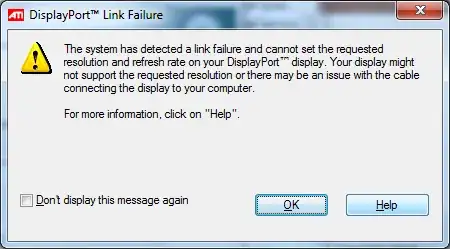
enter image description here

Some Interesting but very unusual discoveries

  • Whenever I disable the display adapter(i.e. Video Card Device, ATI Raedon 4650) at computer management, the system switches to a very basic display, but the switching is no longer an problem and second monitor is gone. Under
  • This will probably shock you all, I leave in a quite cold and moist sorrounding, so i suspected something, and decided to dry my system in the sun. The most strangest thing is after about 30 mins in the sun, the problem is gone(seriously no longer 2 monitor). Then it again reappeard at the morning I have tested this just 2 times due to tight schedule but it strangely works.
  • The Connect/Disconnect Cycle Frequency is higher, when I choose to display on my monitor only, slightly less when on extended mode and very less on duplicate mode.

As per the request I will upload some information about the detected monitor on my next edit.

An Dorfer
  • 1,178
  • 2
  • 8
  • 14
Starx
  • 2,271
  • 5
  • 30
  • 37
  • have you tried disabling the second monitor in device manager ? – Nasreddine Oct 16 '11 at 08:02
  • @Nacereddine yeah, pretty much tried everything – Starx Oct 16 '11 at 09:07
  • Including **what's printed in that message box**? – JdeBP Oct 16 '11 at 10:06
  • @JdeBP, My system is a laptop, and the display is working perfectly, so I dont think there is an issue with the cable and even if there is, how will i fix it? – Starx Oct 16 '11 at 13:54
  • 2
    What makes you think that your laptop only has _one_ display? Have you not found the socket where DisplayPort displays can be plugged in to it, yet? ☺ If an electrical problem with a cable plugged into that socket can be a factor, so too can _an electrical problem with the socket itself_. Your machine is *telling you* what's happening. It's hearing strange things over its DisplayPort link. – JdeBP Oct 16 '11 at 14:57
  • @JdeBP, I think you are right, this problem only occurred after some months of starting to use another monitor as dual monitors. But, I still do that, then it detects 3 monitors instead of two, if the port is causing the problem, how is it detecting 3 monitors. – Starx Oct 17 '11 at 08:36
  • It would help to post the details that Windows is showing for display number #2, as well as its device manager properties (and especially under Details tab : Device description + Hardware Ids). Device manager info for display #1 is also useful. – harrymc Oct 19 '11 at 09:49
  • its not just on windows, even on ubuntu it is showing up. and now it is not showing up, it has been few hours now, since the ghost monitor and finally left, I will update the details if it comes back. I am thinking this is a hardware problem, can someone tell me ways to fix it or prevent it. – Starx Oct 19 '11 at 10:17
  • Can you turn off the display port and any other socket (S-Video or D-Sub VGA Socket) in the BIOS? Check for dust etc in the ports possible causing a short? Do you have any warranty on this laptop? – Yeodave Oct 19 '11 at 11:14
  • 1
    I have a very similar problema with my desktop I "solved" disabling the second device. In my case I'm pretty sure it's a video card hardware malfunction. – Alex Angelico Oct 20 '11 at 20:19
  • It's sounding more and more like a hardware issue - certainly after your moisture and 'sun drying' experiment above... The graphics card is detecting something it thinks is an additional monitor - it's unable to determine what it is (hence the switching and sometimes 3 displaying). – HaydnWVN Nov 03 '11 at 12:08
  • 1
    @HaydnWVN Yeah, I am sure it is some hardware problem, I am currently waiting my warranty to be transferred to this place and then take it to the service centre. BTW, it is any sideeffects of placing my laptop for long timr or frequently too. – Starx Nov 03 '11 at 13:10
  • Warranty certainly sounds like the best option - at least then you can completely rule out a hardware fault. I fail to understand the final question, side effects of placing it? Where? – HaydnWVN Nov 03 '11 at 14:07
  • @HaydnWVN, Oops I meant to ask, if there any sideeffects placing my laptop in the sun, for too long or frequently? – Starx Nov 04 '11 at 06:34
  • It would all depend on how hot it's getting, but from your previous mention of the damp conditions - i would say no it won't harm it, if anything it'll be better for it! If any of my answers have assisted then please vote them up! :) – HaydnWVN Nov 04 '11 at 10:21
  • @HaydnWVN, Actually your comments have been more helpful that the answers. How about updating your answer to include those, I would be sure to vote them up. I even had a bounty setup for this question to bad it proved to be pointless. – Starx Nov 04 '11 at 12:31

2 Answers2

1

What happens when you change the display type in your first image/dialog box's 'Multiple Displays' 'Extend these displays' - can you tell it to just mirror displays? It shouldn't interrupt your programs/displays then.

It might be worth looking in the Bios (if you can get to it) to see if there's an option to disable the additional display port - that might solve any hardware issues with it as the OS wouldn't be seeing it to detect anything.

You can sometimes also disable the extra display with a combination of your Fn key and an F key on the keyboard, although i don't think this would stop Windows detecting changes to it...


In regards to side effects of placing it in the sun to 'warm up'/dry out it would all depend on how hot it's getting, but from your previous mention of the damp conditions - i would say no, it won't harm it, if anything it'll be better for it!

It's sounding more and more like a hardware issue - certainly after your moisture and 'sun drying' experiment above... The graphics card is detecting something it thinks is an additional monitor - it's unable to determine what it is (hence the switching and sometimes 3 displaying).

Warranty certainly sounds like the best option - at least then you can completely rule out a hardware fault.

HaydnWVN
  • 3,268
  • 3
  • 25
  • 49
  • Disabling the extra display would solve the problem, but the extra display keeps connecting and disconnecting frequently, so disabling the monitor is not a permanent solution. – Starx Nov 03 '11 at 06:41
  • 1
    What about HaydnWVN's first suggestion? What happens when you change the display type in your first image/dialog box's 'Multiple Displays' 'Extend these displays' - can you tell it to just mirror displays? Or clone display. – Tog Nov 03 '11 at 07:38
  • Really does depend on the BIOS if you have the option... I've noticed more recent BIOS' tend to be very light on settings and options as most new OS' will do it anyway! Also why isn't disabling the extra display an option? You didn't mention you where using it, so i assumed you where not :) – HaydnWVN Nov 03 '11 at 12:03
  • 1
    No I dont have an option to disable the extra monitor in the bios. – Starx Nov 03 '11 at 13:12
0

I think this is likely to be an issue with the socket itself or internal hardware problem as @JdeBP pointed out. How many display ports do you have on your laptop? Do you have the regular VGA socket and maybe another one like S-video? If the unused display port is malfunctioning while you are using one of the ports for dual monitor set up, then it would explain how you see three display drivers instead of just two.

EDIT: It could be that the motherboard has multiple display ports, but only one is available externally. Electrical malfunctioning could be happening for different reasons. Often, there could be a loose screw, cable, or component which could be creating a short circuit or bad connection. You should open up your laptop and investigate the internals.

dabest1
  • 992
  • 3
  • 10
  • 14
  • no, I have just one vga display port, and I dont have an option to turn off the display port(or atleast I think its not) and the three displays appear when I am connecting to the same vga port. – Starx Oct 19 '11 at 11:16
  • 1
    I agree. This sounds like a hardware problem. Time to check the warranty status. – mauvedeity Oct 22 '11 at 08:54