5

I want to create a video of old photos and I would like to use the Ken Burns effect for more pleasant transitions. I don't think I require inserting any existing video clips into this -- I just want to create a video from my images. It would be nice to be able to add titles and captions, too.

Which Windows-based software can help me with this?

Tamara Wijsman
  • 57,083
  • 27
  • 185
  • 256
Chris Farmer
  • 946
  • 5
  • 15
  • 26
  • 1
    IMHO, don't use the Ken Burns effect for EVERY photo. I watched a video like that one time and found it annoying. I would be inclined to use it for certain photos where it seems like a good fit and use other transitions for other photos. Try to vary it up a bit to keep it interesting for the poor souls that will have to watch it. – Scott Sep 03 '09 at 19:20

7 Answers7

5

Picasa can do this. Go to Create > Movie... and set Transition Style to Pan and Zoom.

Sam Hasler
  • 500
  • 1
  • 9
  • 20
4

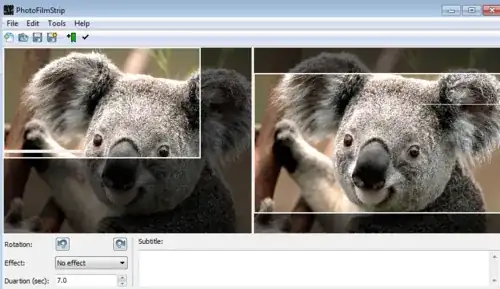
PhotoFilmStrip creates Ken Burns style video from images and allows you to specify the motion path for each picture.

alt text

Gaff
  • 18,569
  • 15
  • 57
  • 68
Sam Hasler
  • 500
  • 1
  • 9
  • 20
1

If I remember correctly, Microsoft Photo Story does that style transition, and it's pretty simple to use. See comment below from someone who's used it more than I.

Main Site

Overview of Features

Tim Lytle
  • 989
  • 2
  • 9
  • 22
  • Microsoft Photo Story DOES give you very fine-grain control over the pan & zoom of every single photo. I tried out a huge amount of programs when trying to make a slideshow for my wedding (including Picasa as mentioned by Sam Hasler) but nothing came anywhere close to being as perfect as Microsoft Photo Story. It was very easy to get it started, easy to configure, and even saves the file embedding the original images so you can move them to a new computer and still change the pan & zoom settings later. Needless to say, I strongly recommend it. – Allie the Icon Oct 06 '09 at 19:43
  • I must say, I used it a few years ago and don't remember much of the process. Thanks for the comment, I've updated my answer. – Tim Lytle Oct 08 '09 at 14:33
0

The Software "DigiRostrum" is what you are looking for: http://cleverplugs.com/digirostrum/

0

I believe the new version of Microsoft Live Movie Maker can do this also, but it will not work on Windows XP.

sean e
  • 2,721
  • 6
  • 23
  • 23
0

I use ProShow for creating movies from photos and it includes the effect you are looking for. And it lets you insert captions, music and a lot more. But it is not free...

Andi
  • 732
  • 1
  • 6
  • 10
0

The one that I used and I found was best for making photo videos was MemoriesOnTV (http://www.codejam.com/). For a really old interface its actually pretty good.

dubRun
  • 878
  • 1
  • 8
  • 9