1

I had Windows 7 installed all september. But I installed Windows XP Professional back because my computer couldn't handle the new OS.

After first boot I tried to install newest flash player (from Adobe website), but it failed. I had my old setup on USB drive and it worked. I don't know is it important or not.

I am watching Youtube videos in my free time (almost every hour). After few days the computer started to freeze when I open a page with the video or close the page with video, not while I watch a video. No BSODs. Nothing in Event viewer. I use Firefox only.

When computer freezes the sound wont. If iTunes is playing a radio station or is it another video playing in background, the sound wont freeze.

Last few days the mouse wont freeze. Its a strange symptom. If I click few times then the cursor will actually freeze.

I just want to know where does this problem come from (hardware - graphics card, old motherboard or it's just some glitch in setups). If it's not graphics card then I will be happy. The graphics card is ATI Radeon HD 4650 - brand new.

Catalyst 11.8 installed.

Things I have tried:

  • Installed newest flash player after a week (the setup didn't fail this time)
  • Installed latest video drivers
  • Deleting cookies
  • Defragmenting hard drive
  • Using TuneUp utilities for computer cleenup
  • Installed latest Mozilla Firefox
  • Cleaned the PC
  • Changed CPU Fan speed almost to max (just to be sure)

Things I haven't tried yet:

  • Didn't try playing videos on other browsers

What can I do now?

Chenmunka
  • 3,228
  • 13
  • 29
  • 38
Little Helper
  • 1,965
  • 8
  • 37
  • 57

2 Answers2

3

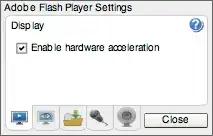
Try right clicking the video while it's playing, and Uncheck "Enable hardware acceleration".

enter image description here

Syclone0044
  • 1,300
  • 9
  • 19
  • Thanks never thougth of that, but now I need to open a bunch of videos to try it out. – Little Helper Nov 08 '11 at 19:48
  • I think the problem is gone. The only problem that sometimes video lags. – Little Helper Nov 08 '11 at 20:13
  • @Roberts The lag might just be your computer hardware – Simon Sheehan Nov 08 '11 at 20:31
  • @Simon Sheehan I know, that's why I used the "old-hardware" tag. I have old but still functional PC, with new video card. So Im woring about video card. – Little Helper Nov 08 '11 at 20:33
  • @Roberts What are the specs? – Simon Sheehan Nov 08 '11 at 20:35
  • @Simon Sheehan Click on my username. – Little Helper Nov 08 '11 at 20:36
  • Sorry but this answer only helped but didn't solve the problem. – Little Helper Nov 09 '11 at 19:40
  • Sounds like the problem clearly lies in your graphics card's hardware video acceleration. I would try either updating the drivers again (if there is a newer release), OR DOWNGRADING your drivers back to a version from 6 months old. I have seen several video cards where the newer drivers have bugs and yet the old releases are rock solid. – Syclone0044 Nov 09 '11 at 19:57
  • 1
    Maybe driver roll back will solve the freezing, but I don't want to use old drivers because I had them installed about month and video card was randomly crashing and it was hard to do something. You can check my other questions and you will find out a lot of problems with old graphics driver. – Little Helper Nov 10 '11 at 13:11
0

Try a LiveUSB to see if it still occurs. If so, likely hw. Better yet, install Linux on the machine as well so you can dual boot.

rjt
  • 1,016
  • 2
  • 14
  • 17