iTunes starts every time I boot my Windows 7 computer. How can I prevent iTunes from starting on Windows startup? Is there a simple setting or do I need to edit the Windows registry to accomplish this?
Asked
Active
Viewed 3.3k times
3

-
Try looking here? http://www.sevenforums.com/tutorials/1401-startup-programs-change.html – Nov 10 '11 at 02:12
-
yea, kind of a simple question for superuser. I meant to post this on http://apple.stackexchange.com/ but I was in a hurry and accidently posted to superuser.com. Would have been a good contribution to the apple knowledge base. – steampowered Nov 10 '11 at 15:58
3 Answers
6
- Go to "Start"
- Click on "Run"
- In the Open box type "msconfig" and then click "OK"
- Select the "Startup" tab at the top
- De-select iTunes from the list and click "Apply" then "OK".
You may need to restart your computer for this change to take effect.

wizlog
- 13,277
- 24
- 77
- 116
2
If you do what wizlog suggested and iTunes is still starting automatically, it could be related to your iPod. iTunes is set--by default--to automatically launch iTunes if it detects an iPod. There is a setting in iTunes, which disables this function.
Edit: This also includes iPhones and iPads too

Tuan
- 174
- 2
0
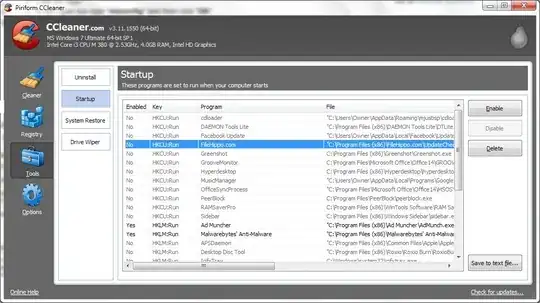
Since MSConfig has already been suggested I can advise you to try CCleaner, a freeware program for cleaning cookies and unnecessary data and with which you can also disable unneeded programs from starting up with a really simple dialogue.
What you (also) need to disable is iTunesHelper which boots up iTunes everytime it detects an iPod/iPhone plugged in. You will be able to find the entry for ituneshelper.exe if you use msconfig or any other start-up application manager.


Miladinoski
- 409
- 2
- 7