62

I have been using UnRarX ( http://www.unrarx.com/ ) and it's free and works well, but often times I will download a rar file in the browser and click on it in the recent downloads lists which will extract it but not show it in the finder.

Ideally I'd like a small program which will extract a rar file and then show the contents / directory where it is extracted to.

I looked at the preferences for UnRarX but didn't see an option like this.

cwd
  • 17,668
  • 42
  • 121
  • 159
  • 2
    Related questions here and at Ask Different: [Recommend archiver software on OSX](http://superuser.com/questions/316656/recommend-archiver-software-on-osx), [Is there any Mac software to handle archives (zip, rar, 7z, tar, etc.) that allows browsing?](http://apple.stackexchange.com/questions/16872/is-there-any-mac-software-to-handle-archives-zip-rar-7z-tar-etc-that-allo), [best free software to make/open rar files](http://apple.stackexchange.com/questions/15664/best-free-software-to-make-open-rar-files) – Lri Nov 15 '11 at 23:55
  • 1
    Unrelated comment - *everyone* uses zip or tar+compress/gzip/bzip, so why do i occasionally stumble on these oddballs who use this obscure RAR format? – Michael Jul 04 '14 at 22:24
  • ^^ zip is the most popular compression format, for a long time rar was second and still is in windows. It gets better compression then zip and allowed password protection and solid archives before anyone else. Everyone in the *nix world maybe ;) – Eric Sebasta Feb 09 '17 at 12:17

5 Answers5

131

If you like to work on the command line, the unrar utility is available via homebrew - you can install it with:

brew install --cask rar
Bill Agee
  • 1,411
  • 2
  • 9
  • 6
  • 17
    And here is the command for extracting: `unrar e filename`. – totymedli May 08 '15 at 07:26
  • 28
    `unrar x filename` to extract with full path (that is what I usally want) – tato Jan 28 '16 at 13:00
  • 4
    You can also get `unrar` with `brew cask install rar`, which has the added bonus of installing the `rar` utility for *creating* archives. – GDP2 Feb 19 '18 at 22:26
14

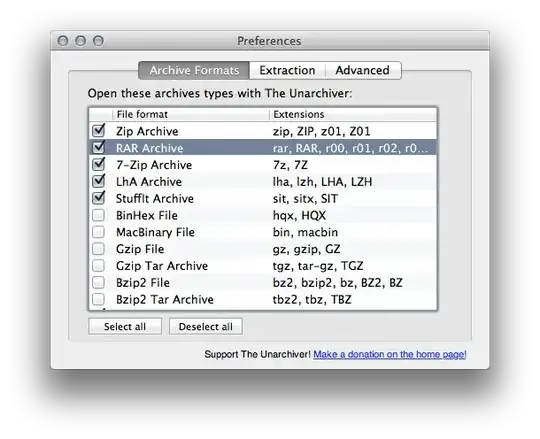
The Unarchiver works rather well for most .rar files — it might have issues with password protected or split archives though, at least in some older versions.

It supports a large number of archive formats and is as easy to use as BOMArchiveHelper : Double click and it extracts.

enter image description here

Daniel Beck
  • 109,300
  • 14
  • 287
  • 334
  • What is BOMArchiveHelper ? – cwd Nov 15 '11 at 21:14
  • @cwd BOMArchiveHelper, or "Archive Utility" since 10.5, is OS X's integrated zip/tar/gz/bz2 extraction tool. – Daniel Beck Nov 15 '11 at 21:16
  • cool. thanks. also - what applescript resources do you have in your toolbox? like script editors, debugging tools, etc? I know that's not related but i don't think you can PM on superuser. – cwd Nov 15 '11 at 21:16
  • @cwd No problem. I actually only use AppleScript Editor (and only recently discovered its useful event log), Google, and lots and lots of time. Once you get over its quirks the documentation via the Library is almost all you need. Is there a specific problem you struggle with? – Daniel Beck Nov 15 '11 at 21:25
  • I'm just used to having more development tools available to troubleshoot problems, see values stored in variables, etc. How do you access the event log? Whenever I use applescript it's almost like taking a step backwards and I just thought I was doing something wrong. ScriptDebugger is kind of cool - you should try it sometime - but I was still hoping for something more. – cwd Nov 15 '11 at 21:37
  • By the way, Daniel has a mail address and sometimes also visits chat ;) – slhck Nov 15 '11 at 23:25
  • @cwd I'm not doing too much AppleScript development, certainly not enough to buy scriptdebugger, so AppleScript editor is fine. Most of what I do with it is documented on this site, actually. The event log is in the window menu. – Daniel Beck Nov 16 '11 at 07:00
5

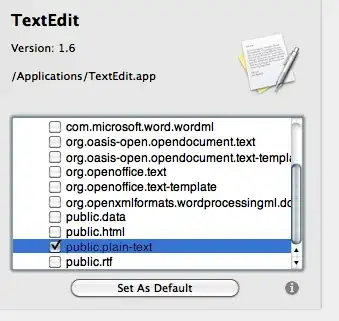
The Unarchiver does that. You can also set it to open the files after extraction. Just open The Unarchiver.app after you've installed it, if you ever need to change the settings again.

enter image description here

slhck
  • 223,558
  • 70
  • 607
  • 592
2

StuffIt expander works for rar and other archives and is free in the App Store.

AXE Labs
  • 777
  • 1
  • 6
  • 12
0

brew install unar

if you want a CLI

https://theunarchiver.com/command-line

  • 1
    While this link may answer the question, it is better to include the essential parts of the answer here and provide the link for reference. Link-only answers can become invalid if the linked page changes. - [From Review](/review/late-answers/1209859) – Destroy666 Aug 10 '23 at 03:09