8

The Local Users and Groups Manager doesn't like running on the Home versions of Windows...
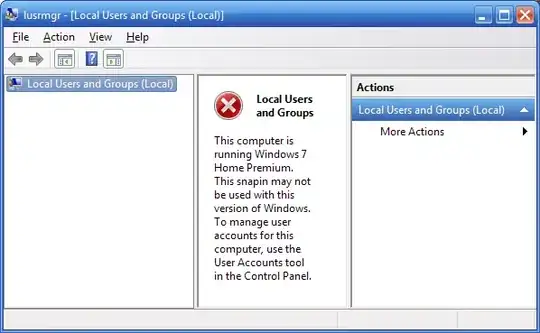
Is there an alternative program which can provide the same amount of flexibility for editing users/groups?

(Control UserPasswords2 doesn't have nearly as much flexibility, so that doesn't count.)

user541686
  • 23,663
  • 46
  • 140
  • 214

2 Answers2

13

You can make a lot of these changes using the net command line tool. It's annoying an inelegant, but it works.

net user can be used to set things like password expiration, add a comment to the user, change display name, modify when the user can log in, whether they can change their password, if the account ever expires, and whether it is enabled.

net localgroup can modify groups and their members.

For full documentation, see net user documentation and net localgroup documentation.

nhinkle
  • 37,198
  • 36
  • 140
  • 177
  • 1
    Wow, I knew about `net group` (which doesn't work!) but not about `net localgroup`... that's indeed very useful. +1 thanks... it's not the easiest tool but yeah, it seems like it works. – user541686 Nov 25 '11 at 09:11
  • You might look around for a third-party GUI front-end to the net tools. One probably exists. As far as I know, it's the only built in way on Home editions of Windows. – nhinkle Nov 25 '11 at 09:15
  • Yeah, that's what I'm hoping for... it's not critical but if I find it it would make things a lot easier. – user541686 Nov 25 '11 at 09:18
  • I'd prefer a hack/crack of a sort that'd eliminate the limitation. There is a working solution for enabling the group policy editor. I wish there were an alike way to enable the local users and groups thing. – Ivan Jul 24 '13 at 23:00
  • 1
    @Ivan [this](http://www.amazon.com/gp/product/B002DHGM50/ref=as_li_ss_tl?ie=UTF8&camp=1789&creative=390957&creativeASIN=B002DHGM50&linkCode=as2&tag=nathhink-20) is the best crack I know of for enabling these features. – nhinkle Jul 24 '13 at 23:19
  • All the PCs I've seen during last 5 years had preinstalled (uncustomizable) Windows version (and it looks ridiculous to pay for a new retail box in this case). I always choose models that come with Pro when possible, but some times I have to deal with H.P. too. – Ivan Jul 25 '13 at 00:33
  • As far as I can remember, there were registry patches that could eliminate some "edition" limitations (like add support for more CPU cores for example) for Windows 2000 and XP. Perhaps there can be something of this kind for W7HP too. – Ivan Jul 25 '13 at 00:36
-3

The Homes editions do not have this feature. They only support two types of users. You'll need the professional edition or above.

Because you can't modify objects' security permissions in the home editions, user groups won't be useful anyways.

billc.cn
  • 7,099
  • 20
  • 36
  • 1
    -1 for several reasons: (1) home editions **do** support the same *features* as professional; they just don't have the tools for editing them; (2) you certainly *can* modify objects' security permissions in home editions (I do that very often); (3) home editions have more than 2 types of users -- in fact, they have as many types as professional, including Users, Administrators, Guests, Backup Operators, etc. – user541686 Nov 25 '11 at 08:45
  • Those types are equivalent to non-exist if you can't access them, aren't they? They may use the same os kernel (so the same features are all built-in), but you don't actually have the license to use them! – billc.cn Nov 25 '11 at 08:50
  • 1
    No one says you don't have the license to use them -- they're perfectly well-accessible while programming with the Windows API. It just so happens that they've removed the GUI. Have you ever typed `control userpasswords2` in the command prompt? It's the perfect counterexample to your speculation. – user541686 Nov 25 '11 at 09:00
  • If they removed the GUI in this edition, then you don't have the license to use the GUI and its associated features. If you're looking for a registry hack or binary patch to reactivate the GUI, you're probably breaching the terms. If you're looking for an alternative interface, you should probably try the `net` command. – billc.cn Nov 25 '11 at 09:06
  • 1
    The GUI clearly says "This **snapin** may not be used", not "This *feature* may not be used". Please stop speculating and actually back up your claims. – user541686 Nov 25 '11 at 09:10
  • [This](http://technet.microsoft.com/en-us/library/bb457127.aspx) is an article on Windows XP Home edition from M$ which clearly says there are basically only two groups. I can't find similar write-ups for later versions of Windows, but it's reasonable to assume the policy is the same. I admit the extra groups may still exist, but M$ has obviously made it difficult to modify or use them. If you really need them, you can use the various sub-commands of `net`. Otherwise you can "upgrade" to Professional and same some time with the GUI. – billc.cn Nov 25 '11 at 09:32
  • 1
    (1) How is Windows XP Home related to Windows 7 Home? I haven't tried XP Home, but on Windows 7 Home Premium there are at least like a dozen groups. (2) There is a clear difference between "breaching the terms" and "if you really need them, use `net`". Is it illegal or is it just difficult? Pick one and stick with it. – user541686 Nov 25 '11 at 09:37
  • (0) I am just trying to help here. (1) I said "I can't find similar write-ups for later versions of Windows, but it's reasonable to assume the policy is the same." (2) I said "If they removed the GUI in this edition, then you don't have the license to use the GUI and its associated features." Obviously the security group feature is always there in Windows NT kernel, they won't remove that. IMHO, the convenience of a GUI that manages the groups is a feature as well and you're told not to use it. Also, it's very reasonable to assume that extends to the use of the other groups. – billc.cn Nov 25 '11 at 09:42
  • What is the point of this argument? Nobody is going to get arrested for trying to add users to a group through alternate means. There are legitimate reasons for wanting to know how to do this. To both of you, please keep the conversation to the topic at hand - how to get this done. – nhinkle Nov 26 '11 at 18:21